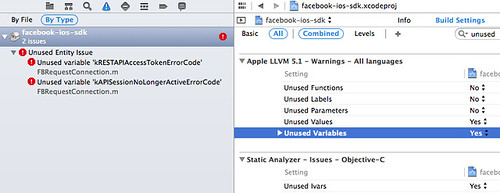
上次手滑更新 Xcode 後,發現新版 Facebook SDK 3.13 (2014/03/06 15:39:14) 編譯時會出現 Unused Entity Issue: Unused Variable 的錯誤,且看到有人提出了,暫時就先自己處理一下吧 :P
Google Cloud Messaging for Android (GCM) is a free service that helps developers send data from servers to their Android applications on Android devices, and upstream messages from the user's device back to the cloud. This could be a lightweight message telling the Android application that there is new data to be fetched from the server (for instance, a "new email" notification informing the application that it is out of sync with the back end), or it could be a message containing up to 4kb of payload data (so apps like instant messaging can consume the message directly). The GCM service handles all aspects of queueing of messages and delivery to the target Android application running on the target device.一遍後,其實 GCM 的架構跟 Apple Push Notification service (APNs) 很像,主要都是先由 Mobile device 跟 Android server (Apple server) 註冊一個 token,接著再請 Mobile device 將此 token 交給 Service Provide。而 Service Provider 就利用這個 token 跟 Mobile device 傳訊息。比較不一樣的是 GCM 提供的架構多了一些設計,詳細請參考官網資料,在此僅簡易筆記一下。
$ curl --header "Authorization: key=API_Key" --header Content-Type:"application/json" https://android.googleapis.com/gcm/send -d '{"to":"MobileDeviceToken","data":{"message":"hello world","action":"com.example.gcm"}}'
<?xml version="1.0" encoding="utf-8"?>

<manifest xmlns:android="http://schemas.android.com/apk/res/android"

    package="com.example.gcm"

    android:versionCode="1"

    android:versionName="1.0" >


    <uses-sdk

        android:minSdkVersion="8"

        android:targetSdkVersion="15" />


    <!--  ADD FOR Google Cloud Messaging ### Begin -->

    <uses-permission android:name="android.permission.INTERNET" />

    <uses-permission android:name="android.permission.GET_ACCOUNTS" />

    <uses-permission android:name="android.permission.WAKE_LOCK" />

    <uses-permission android:name="com.google.android.c2dm.permission.RECEIVE" />

 <permission android:name="com.example.gcm.permission.C2D_MESSAGE"

        android:protectionLevel="signature" />

 <uses-permission android:name="com.example.gcm.permission.C2D_MESSAGE" />

    <!--  ADD FOR Google Cloud Messaging ### End -->


    <application

        android:allowBackup="true"

        android:icon="@drawable/ic_launcher"

        android:label="@string/app_name"

        android:theme="@style/AppTheme" >

        <activity

            android:name="com.example.gcm.MainActivity"

            android:label="@string/app_name" >

            <intent-filter>

                <action android:name="android.intent.action.MAIN" />


                <category android:name="android.intent.category.LAUNCHER" />

            </intent-filter>

        </activity>


        <!--  ADD FOR Google Cloud Messaging ### Begin -->

        <meta-data android:name="com.google.android.gms.version"

         android:value="@integer/google_play_services_version" />

        <receiver

            android:name=".GcmBroadcastReceiver"

            android:permission="com.google.android.c2dm.permission.SEND" >

            <intent-filter>

                <action android:name="com.google.android.c2dm.intent.RECEIVE" />

                <category android:name="com.example.gcm" />

            </intent-filter>

        </receiver>

        <service android:name=".GcmIntentService" />

        <!--  ADD FOR Google Cloud Messaging ### End -->


    </application>

</manifest>
package com.example.gcm;


import com.google.android.gms.gcm.GoogleCloudMessaging;


import android.content.Context;

import android.content.Intent;

import android.os.Bundle;

import android.support.v4.content.WakefulBroadcastReceiver;

import android.util.Log;


public class GcmBroadcastReceiver extends WakefulBroadcastReceiver {

 private static final String TAG = "GCM";


 @Override

 public void onReceive(Context context, Intent intent) {

  // TODO Auto-generated method stub

  Log.i(TAG, "GcmBroadcastReceiver");


  GoogleCloudMessaging gcm = GoogleCloudMessaging.getInstance(context);

  String messageType = gcm.getMessageType(intent);

  Log.i(TAG, "GcmBroadcastReceiver messageType:"+messageType);


  Bundle extras = intent.getExtras();

  if (!extras.isEmpty()) {

   if (GoogleCloudMessaging.MESSAGE_TYPE_SEND_ERROR.equals(messageType)) {


   } else if (GoogleCloudMessaging.MESSAGE_TYPE_DELETED.equals(messageType)) {


   } else if (GoogleCloudMessaging.MESSAGE_TYPE_MESSAGE.equals(messageType)) {


   }

   Log.i(TAG, "GcmBroadcastReceiver Received: " + extras.toString());

  }

 }

}
public class MainActivity extends ActionBarActivity {

 private static final String TAG = "GCM";

 public static final String EXTRA_MESSAGE = "message";

 public static final String PROPERTY_REG_ID = "registration_id";

 private static final String PROPERTY_APP_VERSION = "appVersion";

 private final static int PLAY_SERVICES_RESOLUTION_REQUEST = 9000;

 String SENDER_ID = "Your-Sender-ID";


 GoogleCloudMessaging gcm;

 AtomicInteger msgId = new AtomicInteger();

 String regid;

 Context context;


 private boolean checkPlayServices() {

     int resultCode = GooglePlayServicesUtil.isGooglePlayServicesAvailable(this);

     if (resultCode != ConnectionResult.SUCCESS) {

         if (GooglePlayServicesUtil.isUserRecoverableError(resultCode)) {

             GooglePlayServicesUtil.getErrorDialog(resultCode, this,

                     PLAY_SERVICES_RESOLUTION_REQUEST).show();

         } else {

             Log.i(TAG, "This device is not supported.");

             finish();

         }

         return false;

     }

     return true;

 }


 private String getRegistrationId(Context context) {

     final SharedPreferences prefs = getGCMPreferences(context);

     String registrationId = prefs.getString(PROPERTY_REG_ID, "");

     if (registrationId.isEmpty()) {

         Log.i(TAG, "Registration not found.");

         return "";

     }

     // Check if app was updated; if so, it must clear the registration ID

     // since the existing regID is not guaranteed to work with the new

     // app version.

     int registeredVersion = prefs.getInt(PROPERTY_APP_VERSION, Integer.MIN_VALUE);

     int currentVersion = getAppVersion(context);

     if (registeredVersion != currentVersion) {

         Log.i(TAG, "App version changed.");

         return "";

     }

     return registrationId;

 }


 private SharedPreferences getGCMPreferences(Context context) {

     // This sample app persists the registration ID in shared preferences, but

     // how you store the regID in your app is up to you.

     return getSharedPreferences(MainActivity.class.getSimpleName(),

             Context.MODE_PRIVATE);

 }


 private static int getAppVersion(Context context) {

     try {

         PackageInfo packageInfo = context.getPackageManager()

                 .getPackageInfo(context.getPackageName(), 0);

         return packageInfo.versionCode;

     } catch (NameNotFoundException e) {

         // should never happen

         throw new RuntimeException("Could not get package name: " + e);

     }

 }

 private void registerInBackground() {

  new AsyncTask<Object, Object, Object>() {


   @Override

   protected Object doInBackground(final Object... arg0) {

    // TODO Auto-generated method stub

    String msg = "";

             try {

                 if (gcm == null) {

                     gcm = GoogleCloudMessaging.getInstance(context);

                 }

                 regid = gcm.register(SENDER_ID);

                 msg = "Device registered, registration ID=" + regid;


                 // You should send the registration ID to your server over HTTP,

                 // so it can use GCM/HTTP or CCS to send messages to your app.

                 // The request to your server should be authenticated if your app

                 // is using accounts.

                 sendRegistrationIdToBackend();


                 // For this demo: we don't need to send it because the device

                 // will send upstream messages to a server that echo back the

                 // message using the 'from' address in the message.


                 // Persist the regID - no need to register again.

                 storeRegistrationId(context, regid);

             } catch (IOException ex) {

                 msg = "Error :" + ex.getMessage();

                 // If there is an error, don't just keep trying to register.

                 // Require the user to click a button again, or perform

                 // exponential back-off.

             }

             return msg;

   }


  }.execute(null, null, null);

 }


 private void sendRegistrationIdToBackend() {

     // Your implementation here.

 }


 private void storeRegistrationId(Context context, String regId) {

     final SharedPreferences prefs = getGCMPreferences(context);

     int appVersion = getAppVersion(context);

     Log.i(TAG, "Saving regId on app version " + appVersion);

     Log.i(TAG, "Saving regId: " + regId);

     SharedPreferences.Editor editor = prefs.edit();

     editor.putString(PROPERTY_REG_ID, regId);

     editor.putInt(PROPERTY_APP_VERSION, appVersion);

     editor.commit();

 }


 @Override

 protected void onCreate(Bundle savedInstanceState) {

  super.onCreate(savedInstanceState);

  setContentView(R.layout.activity_main);


        context = getApplicationContext();


        // Check device for Play Services APK. If check succeeds, proceed with

        //  GCM registration.

        if (checkPlayServices()) {

            gcm = GoogleCloudMessaging.getInstance(this);

            regid = getRegistrationId(context);


            if (regid.isEmpty()) {

                registerInBackground();

            }

        } else {

            Log.i(TAG, "No valid Google Play Services APK found.");

        }


  if (savedInstanceState == null) {

   getSupportFragmentManager().beginTransaction()

     .add(R.id.container, new PlaceholderFragment()).commit();

  }

 }

// ...

}

