顯示具有 error 標籤的文章。 顯示所有文章

2014年8月11日 星期一

AWS 筆記 - 透過 Script 半自動化處理 MySQL Replication Error

用了 AWS RDS 一陣子了,之前一直沒搞懂為何 call mysql.rds_skip_repl_error; 一次只能清一條 Error ,直到另一台 MySQL Slave Server 出錯,變成也要手動清除錯誤訊息時,才搞懂原理就是這樣,一次只能清一條。

所以,對於 MySQL Replication Error 不知不覺就生了兩種 script 來應付,一種是 RDS 當 MySQL Replication Slave 用的,另一個則是一般 MySQL Replication Slave Server 用的:

處理 AWS RDS MySQL Replication Slave Servers:

#!/bin/sh
a=0
while [ $a -lt 1000 ]
do
        check=`echo "SHOW SLAVE STATUS \G" | mysql -h YOUR_AWS_RDS_SERVER -u root -ppassword | grep "Last_SQL_Error:" | grep -c "Could not execute"`
        if [ $check -eq 0 ] ; then
                break
        fi
        echo "CALL mysql.rds_skip_repl_error;" | mysql -h YOUR_AWS_RDS_SERVER -u root -ppassword
        a=$(( $a + 1 ))
done


處理 MySQL Replication Slave Servers:

#!/bin/sh

a=0
while [ $a -lt 2000 ]
do
        check=`echo "SHOW SLAVE STATUS \G" | mysql -h YOUR_MYSQL_SLAVE_SERVER -u root -ppassword | grep "Last_SQL_Error:" | grep -c "Error "`
        if [ $check -eq 0 ] ; then
                break
        fi
        check=`echo "STOP SLAVE; SET GLOBAL SQL_SLAVE_SKIP_COUNTER = 1; START SLAVE;" | mysql -h localhost -u root -ppassword`
        a=$(( $a + 1 ))
        sleep 3
done


以上是用在 MySQL Server 彼此算異質系統,只能先透過這招頂替了。

2014年7月3日 星期四

iOS 開發筆記 - 使用 C++ Source Code

最近把玩練習時,想說用一下 CPP 的,寫完後發現要整進 Xcode 卻發現 compile error,例如在 AppDelete.m 中:

#include "Test.h"

- (BOOL)application:(UIApplication *)application didFinishLaunchingWithOptions:(NSDictionary *)launchOptions
{
    // Override point for customization after application launch.
 
    Test *obj = new Test();
 
    return YES;
}


其中 Test.h:

#ifndef __Test__Test__
#define __Test__Test__

#include <iostream>

class Test {
public:
    int x;
};


#endif /* defined(__Test__Test__) */


編譯時就會顯示找不到 iostream 等訊息,解法?早期大概有指定 Compile 參數,現在還滿容易的,只要把用到 CPP 的 Objective-C 檔案,從 .m 改成 .mm 即可。

以此就是將 AppDelete.m 更名為 AppDelete.mm ,就可以編譯成功,真是太方便了!

2014年6月6日 星期五

[Linux] PHPMyAdmin - Table 'phpmyadmin.pma_table_uiprefs' doesn't exist @ Ubuntu 14.04

主因是將某處 DB 搬遷後,統一用一個 PHPMyAdmin 管理多個 DB Server ,因此出現的問題。

解法:

$ locate create_tables.sql.
/usr/share/doc/phpmyadmin/examples/create_tables.sql.gz
$ cp /usr/share/doc/phpmyadmin/examples/create_tables.sql.gz /tmp
$ cd /tmp && gunzip /tmp/create_tables.sql.gz

$ mysql -h xxxx -u root -p < create_tables.sql
$ sudo vim /etc/phpmyadmin/config.inc.php
更新 'pma_bookmark' to 'pma__bookmark' 等一系列項目,如:
$cfg['Servers'][$i]['bookmarktable'] = 'pma__bookmark';
$cfg['Servers'][$i]['relation'] = 'pma__relation';
$cfg['Servers'][$i]['table_info'] = 'pma__table_info';
$cfg['Servers'][$i]['table_coords'] = 'pma__table_coords';
$cfg['Servers'][$i]['pdf_pages'] = 'pma__pdf_pages';
$cfg['Servers'][$i]['column_info'] = 'pma__column_info';
$cfg['Servers'][$i]['history'] = 'pma__history';
$cfg['Servers'][$i]['table_uiprefs'] = 'pma__table_uiprefs';
$cfg['Servers'][$i]['designer_coords'] = 'pma__designer_coords';
$cfg['Servers'][$i]['tracking'] = 'pma__tracking';
$cfg['Servers'][$i]['userconfig'] = 'pma__userconfig';
$cfg['Servers'][$i]['recent'] = 'pma__recent';

2014年3月16日 星期日

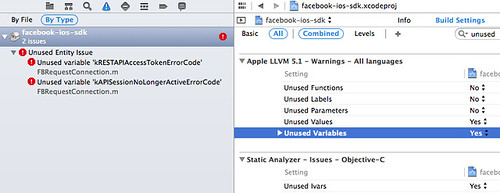
[OSX] Xcode 5.1 - Unused Entity Issue: Unused Variable @ Mac OS X 10.9.2

Unused Entity Issue - Unused Variable

上次手滑更新 Xcode 後,發現新版 Facebook SDK 3.13 (2014/03/06 15:39:14) 編譯時會出現 Unused Entity Issue: Unused Variable 的錯誤,且看到有人提出了,暫時就先自己處理一下吧 :P