$ sudo su

# ntpdate -u $(systemsetup -getnetworktimeserver|awk '{print $4}')
2014年3月11日 星期二
[OSX] 使用 ntpdate 和 systemsetup 更新系統時間 @ Mac OS X 10.9.2
公司的 Air 被幫我當成不關機的裝置,只是隨著不關機的時間拉長時,系統的時間就會開始延遲,解法就是用 ntpdate 設定一下。

[Javascript] AngularJS 與 img src & img ng-src
用 AngularJS 在處理 img 時,沒看手冊的用法:
雖然網頁顯示一切正常,但仔細看 Google Chrome 開發人員工具時,發現有奇怪的 requests 發出去,是的,發出去的資料就是 http://hostname/%7B%7Bitem.url%7D%7D ,解法就是改用 ng-src 吧!
AngularJS 官方文件 ngSrc :
<img src="{{item.url}}" />
雖然網頁顯示一切正常,但仔細看 Google Chrome 開發人員工具時,發現有奇怪的 requests 發出去,是的,發出去的資料就是 http://hostname/%7B%7Bitem.url%7D%7D ,解法就是改用 ng-src 吧!
<img ng-src="{{item.url}}" />
AngularJS 官方文件 ngSrc :
Using Angular markup like {{hash}} in a src attribute doesn't work right: The browser will fetch from the URL with the literal text {{hash}} until Angular replaces the expression inside {{hash}}. The ngSrc directive solves this problem.
2014年3月6日 星期四
AWSome Day 2014 Taipei
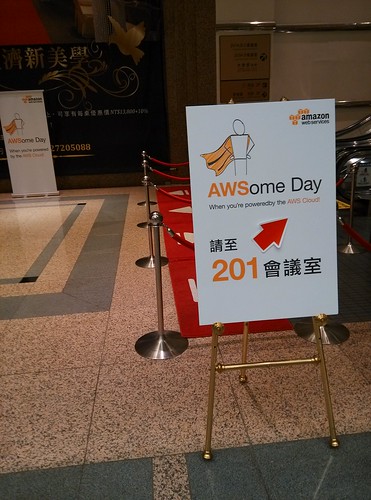
記得上一回使用 Amazon EC2 已經是 2009 年年底了,當時有 firefox plugin 可以管 EC2 就很威了!經過幾年少用 EC2 後,今年想說該複習一下,就報名參加了 :P
聽完一輪的想法:
- AWS 提供很完整的方案,甚至企業型用法的 Amazon Virtual Private Cloud (VPC)
- 比起 2009 年的概念,現在有很完整的 Access control 稱作 AWS Identity and Access Management (IAM)
- 現在有 Amazon Relational Database Service (RDS),我猜應該本就有 HA 功能,而 RDS 所謂的 HA 方案是指跨 region 程度的。此外自家也有推 Amazon DynamoDB 的 NOSQL 方案
- 檔案儲存的 Amazon S3 也有便利的 access control !以 bucket (類似folder) 為單位
- Amazon ElastiCache 還可以建 Cluster ,有常見 Redis 跟 Memcached 方案
- AWS Elastic Load Balancing (ELB) ,如其名 load balancing
- Amazon CloudWatch,可以監控機器狀況,若太操時可以選擇自動加開機器等
- 有點內建 CDN 功能:世界各地有 Region 跟 Edge,其中 Region 是可以開機器,而 Edge 則是 cache
聽到這裡,我認為 AWS 真的很猛,大概把一般公司對 MIS 的需求都做完了 XD 難怪一直主打 startup 廣告,如 airbnb 如何在 2012 年靠 AWS 服務,處理六個月內倍增的訂單數等,其他家則是說用了 AWS 省了多少錢。
對於錢的角度,我認為 AWS 就像買保險一樣,初期看起來花費比其他家 VPS 貴,但它提供的方案很全面性,如彈性計算的 EC2、資料庫 RDS、檔案儲存備份 S3、服務分流 ELB 跟服務監控與自動彈性調整 CloudWatch 等,一整個讓 startup 不必分心於管機器這件事,更可以專心做服務。流量大就砸錢,錢花完就增資 XD
管機器啊,只有真的管過才知道機器難管之處 XDDD 所以,要怎樣說服老闆花錢又是另一門學問囉!例如顧一個 MIS 年花 60 萬好了,但這個價碼初期用 AWS (WebOps) 好像很噴錢(大多都是 RD 兼職),但一旦服務流量變大時,馬上加人不見得可以處理好,用 AWS 卻像買個保險可以快速解決,甚至某些服務性質來說,有可能省到錢(節省人力)。
最後一提...不是用了 AWS 就可以自動 scale up!當然是自家服務本身就要設計,所以在 AWS 的傳道上,會鼓吹一開始就設計可以 scale up 的架構,而非像其他 startup 先不作重在 scale up ,等做大再煩惱 :P
相關連結:
相關連結:
2014年3月5日 星期三
iOS 開發筆記 - App Submission Feedback (Resolution Center) - 2.23: Apps must follow the iOS Data Storage Guidelines or they will be rejected
這理由收過兩次才過,累積成就筆記一下 XD 與其跟 Reviewer 解釋資料產生本來就會耗那麼多空間,不如還是自己乖乖丟到 NSTemporaryDirectory 吧 Orz
解法:
We found that your app does not follow the iOS Data Storage Guidelines, which is required per the App Store Review Guidelines.


In particular, we found that on launch and/or content download, your app stores 1x.xx MB. To check how much data your app is storing:


- Install and launch your app

- Go to Settings > iCloud > Storage & Backup > Manage Storage

- If necessary, tap "Show all apps"

- Check your app's storage


The iOS Data Storage Guidelines indicate that only content that the user creates using your app, e.g., documents, new files, edits, etc., should be backed up by iCloud.


Temporary files used by your app should only be stored in the /tmp directory; please remember to delete the files stored in this location when the user exits the app.


Data that can be recreated but must persist for proper functioning of your app - or because customers expect it to be available for offline use - should be marked with the "do not back up" attribute. For NSURL objects, add the NSURLIsExcludedFromBackupKey attribute to prevent the corresponding file from being backed up. For CFURLRef objects, use the corresponding kCFURLIsExcludedFromBackupKey attribute.


For more information, please see Technical Q&A 1719: How do I prevent files from being backed up to iCloud and iTunes?.


It is necessary to revise your app to meet the requirements of the iOS Data Storage Guidelines.

For discrete code-level questions, you may wish to consult with Apple Developer Technical Support. Please be sure to:


- include the complete details of your rejection issues

- prepare any symbolicated crash logs, screenshots, and steps to reproduce the issues for when the DTS engineer follows up.


For information on how to symbolicate and read a crash log, please see Tech Note TN2151 Understanding and Analyzing iPhone OS Application Crash Reports.


If you have difficulty reproducing this issue, please try testing the workflow as described in <https://developer.apple.com/library/ios/qa/qa1764/>Technical Q&A QA1764: How to reproduce a crash or bug that only App Review or users are seeing.
解法:
- 挑 NSTemporaryDirectory() 來儲存資料
- 當 app 被強制或使用者手動關閉時,清一下資料吧(連續兩下 Home 等切到背景不算)
- (void)applicationWillTerminate:(UIApplication *)application {

 // remove data ...

}
2014年3月4日 星期二
[Javascript] 偵測 AngularJS rendered a template - 以 Google Visualization API 應用為例
用 AngularJS MVC 架構時,想撈出資料後,再動態用 Google Visualization API 繪出資料。然而,在 AngularJS 架構下,不該怎樣偵測它已經完成呈現部分(rendered a template),依照原理,只好看看何時能取得到某物件(document.getElementById("tag_id"))。
Javascript:
HTML:
由於 <DIV> 是依照 AngularJS 架構產生的,而 Google Visualization API 需要綁定在某個 div 物件上,因此才需要去偵測 AngularJS 到底將 div 呈現出來了沒。
範例:
Javascript:
(function(){


 $scope.$watch(function(){

  return document.getElementById(tag);

 },function(value){

  var val = value || null;

  if(val) {

   // doing...

  }

 });

})();
HTML:
<body ng-controller="appControl">

 <div ng-repeat="item in data" id="{{item.id}}">{{item.id}}</div>

</body>
由於 <DIV> 是依照 AngularJS 架構產生的,而 Google Visualization API 需要綁定在某個 div 物件上,因此才需要去偵測 AngularJS 到底將 div 呈現出來了沒。
範例:
<script type='text/javascript' src='//www.google.com/jsapi'></script>

<script type='text/javascript' src='//ajax.googleapis.com/ajax/libs/angularjs/1.2.14/angular.min.js'></script>

<script type='text/javascript'>


google.load('visualization', '1', {'packages': ['corechart']});


function appControl($scope, $http, $location) {

 $scope.data = null;

 $scope.query = function() {

  $http.get('/api', {}).success(function(data){

   $scope.data = data;

   for( var i=0 ; i<data.length ; ++i ) {

    (function(){

     var job_id = data[i]['id'];

     var job_title = data[i]['title'];

     var job_data = data[i]['data'];


     $scope.$watch(function(){

      return document.getElementById(job_id);

     }, function(value) {

      var check = value || null;

      if(check) {

       var data = new google.visualization.arrayToDataTable(job_data, true);

       var options = { title: job_title, is3D: true };

       //var chart = new google.visualization.PieChart(document.getElementById(job_id));

       var chart = new google.visualization.PieChart(check);

       chart.draw(data, options);

      }

     });

    })();

   }

  }).error(function(data){

  });

 };

 $scope.query();

}


</script>
訂閱:
文章 (Atom)