- iOS Simulator -> Hardware -> Keyboard -> 取消 Connect Hardware Keyboard
- 在 iOS Simulator 操作環境上,使用快速鍵呼叫:shift + command + K
2015年10月13日 星期二
iOS 開發筆記 - 處理 Simulator 上 Keyboard 沒顯示的問題
原來 iOS 8 Simulator 操作習慣改了,預設對應到實體鍵盤,若需要顯示虛擬鍵盤有兩種方式:

2015年10月12日 星期一
APC Back-UPS ES 500 / BE500TW 電池規格
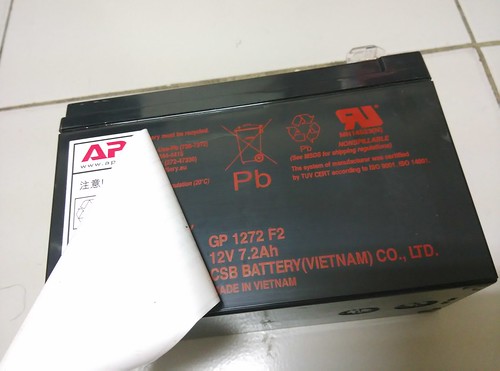
在 2009 年秋天買了一台 UPS 把玩,如今 6 年了,前陣子買了台立燈給他插上去,正逢颱風停電倒變成另類的用途 XD 由於習慣出門還是把它當延長線關掉,最近開啟時會出現長叫聲,雖然一開始經過幾次反覆開關可以避開,如今卻也無解了 XD 只要翻翻使用手冊啦
Troubleshooting and Battery Replacement:http://www.apcmedia.com/salestools/ASTE-6Z7V8R/ASTE-6Z7V8R_R0_EN.pdf?sdirect=true
原先想說電池很重要,上個官網買好了,但...沒有台灣 XD 翻出電池想找 spec 倒是一直沒找到,最後才發現被陰了,原因是被貼子蓋掉啦!
這幾年跟越南真有緣 :P 總之,上個露天逛一下,應該加運費 400 可搞定。
規格紀錄一下:
- 12V 7.2AH
- 長 151 mm、寬 651 mm、高 94 mm,總高 97mm
2015年10月6日 星期二
[PHP] 處理 PHP CodeIgniter 與 apache web server、nginx 的 Rewrite Rules
之前比較常用 Apache Web server ,在使用 PHP CodeIngiter 時,常常設定 Rewrite Rules 時,需要做一些手腳,例如:http://hostname/ci 想要瀏覽到 PHP CodeIgniter Project,而 ci 這個並非實體目錄,且 PHP CI Project 並非擺在 DocumentRoot 裡,這時就有很多環境變數需處理。
由於要符合 PHP CodeIgniter 的 routing rules,必須把 /ci 這個 path 給去掉,在 Apache Web server 透過 RewriteBase 處理,而 Nginx 又更麻煩一點,需處理 fastcgi_param REQUEST_URI 跟 fastcgi_param SCRIPT_FILENAME 資訊。
Apache 的設定:
Nginx 設定:
其他 Nginx 筆記:
由於要符合 PHP CodeIgniter 的 routing rules,必須把 /ci 這個 path 給去掉,在 Apache Web server 透過 RewriteBase 處理,而 Nginx 又更麻煩一點,需處理 fastcgi_param REQUEST_URI 跟 fastcgi_param SCRIPT_FILENAME 資訊。
Apache 的設定:
Alias /ci /data/ci-project

<Directory /data/ci-project>

       Options FollowSymLinks

       DirectoryIndex index.php

       AllowOverride None


       Require all granted

       <IfModule mod_rewrite.c>

               RewriteEngine On

               RewriteBase /ci


               RewriteCond %{REQUEST_URI} ^system.*

               RewriteRule ^(.*)$ /index.php?/$1 [L]


               RewriteCond %{REQUEST_URI} ^application.*

               RewriteRule ^(.*)$ /index.php?/$1 [L]


               RewriteCond %{REQUEST_FILENAME} !-f

               RewriteCond %{REQUEST_FILENAME} !-d

               RewriteRule ^(.*)$ index.php?/$1 [L]

       </IfModule>

</Directory>
Nginx 設定:
        set $request_prefix '/ci/';

        set $ci_sys_dir '/opt/actions-channel-api/';


        location /ci/ {

                alias $ci_sys_dir;

                index  index.php index.html index.htm;


                try_files $uri $uri/ /ci/index.php?$query_string;

        }

        location ~* \.php$ {

                fastcgi_pass 127.0.0.1:9000;

                fastcgi_index index.php;

                fastcgi_split_path_info ^(.+\.php)(.*)$;

                include fastcgi_params;


                set $target_request_uri $request_uri;

                if ($target_request_uri ~ ^/ci/(.*)$ ) {

                        set $target_request_uri /$1;

                }

                fastcgi_param REQUEST_URI $target_request_uri;


                set $target_fastcgi_script_name $fastcgi_script_name;

                if ($target_fastcgi_script_name ~ ^/ci/(.*)$ ) {

                        set $target_fastcgi_script_name $1;

                }

                fastcgi_param SCRIPT_FILENAME $ci_sys_dir$target_fastcgi_script_name;

        }
其他 Nginx 筆記:
- alias 的數值記得要補上最後的 "/" ;alias 跟 root 的最大差別是 alias 的位置不需要在 document root 裡頭
- 在 try_files 流程中,一旦符合條件後,就不會再執行該 nginx location 底部項目,因此還是把 php handler 拉到最外層,而不要全部都寫在 location /ci/ 此區塊裡頭
- nginx 可定義很多環境變數,若想要看它就寫到 log 即可:
- http {
log_format proxy ' "$request" "$status" "$http_referer" "$http_user_agent" $request_time $upstream_response_time "$ci_sys_dir" "$target_fastcgi_script_name" "$target_request_uri" '
}
2015年10月4日 星期日
iOS 開發筆記 - 修正 Launch Image 失效問題
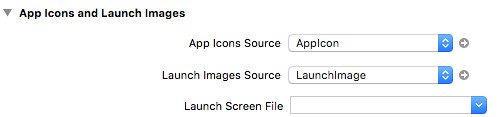
換了 Xcode 7.0.1 後,想說認真一下填滿 Images.xcassets 中的 LaunchImage,但始終沒有成功,總覺得一直讀取 Storyboard 的資料!
最後終於搞懂了,記得清空 Launch Screen File 欄位就沒問題啦。
若有碰到 ERROR ITMS-90475 iPad Multitasking support 的問題,再到 info.plist 塞入:
<key>UIRequiresFullScreen</key>

<string>YES</string>
即可解決。
2015年10月3日 星期六
iOS 開發筆記 - 下載舊版 Simulator,如 iOS 8 Simulator
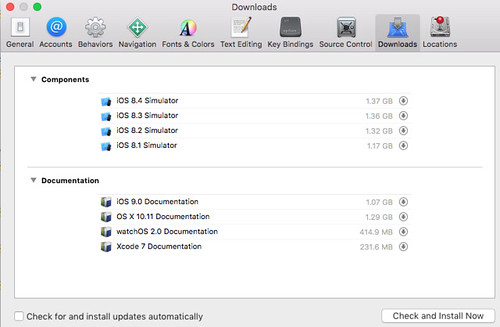
記得很久以前,我還有把 Xcode 3,4 系列燒成光碟,為的就是舊版 simulator,後來不知不覺就都不需要,甚至把玩 app 都直接用最新版 iOS siumulator 跟 sdk 了。不過這次 iOS 9 跟 iOS 8 有一些 layout 問題,所以還是找一下舊版 simulator 吧!
Xcode -> Preferences -> Downloads 或是 iOS Simulator -> Hardware -> Device -> Manage Devices -> 左下角 + -> iOS Version -> Download more simulators 。
此外,有人說在 OS X EI Capitan 已不支援 iOS 7 Simulator 了 :P 所以在此版本的作業系統下載不到。
另外一提,安裝 Simulator 需要用高級權限 Orz 不然會有以下訊息:
Cloud not download and install iOS 8.x Simulator.
高級權限的方式:
sudo /Applications/Xcode.app/Contents/MacOS/Xcode
訂閱:
文章 (Atom)