2014年3月5日 星期三

iOS 開發筆記 - App Submission Feedback (Resolution Center) - 2.23: Apps must follow the iOS Data Storage Guidelines or they will be rejected

這理由收過兩次才過,累積成就筆記一下 XD 與其跟 Reviewer 解釋資料產生本來就會耗那麼多空間,不如還是自己乖乖丟到 NSTemporaryDirectory 吧 Orz

We found that your app does not follow the iOS Data Storage Guidelines, which is required per the App Store Review Guidelines.

In particular, we found that on launch and/or content download, your app stores 1x.xx MB. To check how much data your app is storing:

- Install and launch your app
- Go to Settings > iCloud > Storage & Backup > Manage Storage
- If necessary, tap "Show all apps"
- Check your app's storage

The iOS Data Storage Guidelines indicate that only content that the user creates using your app, e.g., documents, new files, edits, etc., should be backed up by iCloud.

Temporary files used by your app should only be stored in the /tmp directory; please remember to delete the files stored in this location when the user exits the app.

Data that can be recreated but must persist for proper functioning of your app - or because customers expect it to be available for offline use - should be marked with the "do not back up" attribute. For NSURL objects, add the NSURLIsExcludedFromBackupKey attribute to prevent the corresponding file from being backed up. For CFURLRef objects, use the corresponding kCFURLIsExcludedFromBackupKey attribute.

For more information, please see Technical Q&A 1719: How do I prevent files from being backed up to iCloud and iTunes?.

It is necessary to revise your app to meet the requirements of the iOS Data Storage Guidelines.
For discrete code-level questions, you may wish to consult with Apple Developer Technical Support. Please be sure to:

- include the complete details of your rejection issues
- prepare any symbolicated crash logs, screenshots, and steps to reproduce the issues for when the DTS engineer follows up.

For information on how to symbolicate and read a crash log, please see Tech Note TN2151 Understanding and Analyzing iPhone OS Application Crash Reports.

If you have difficulty reproducing this issue, please try testing the workflow as described in <https://developer.apple.com/library/ios/qa/qa1764/>Technical Q&A QA1764: How to reproduce a crash or bug that only App Review or users are seeing.


解法:
  • 挑 NSTemporaryDirectory() 來儲存資料
  • 當 app 被強制或使用者手動關閉時,清一下資料吧(連續兩下 Home 等切到背景不算)

    - (void)applicationWillTerminate:(UIApplication *)application {
    // remove data ...
    }

2014年3月4日 星期二

[Javascript] 偵測 AngularJS rendered a template - 以 Google Visualization API 應用為例

用 AngularJS MVC 架構時,想撈出資料後,再動態用 Google Visualization API 繪出資料。然而,在 AngularJS 架構下,不該怎樣偵測它已經完成呈現部分(rendered a template),依照原理,只好看看何時能取得到某物件(document.getElementById("tag_id"))。

Javascript:

(function(){

$scope.$watch(function(){
return document.getElementById(tag);
},function(value){
var val = value || null;
if(val) {
// doing...
}
});
})();


HTML:

<body ng-controller="appControl">
<div ng-repeat="item in data" id="{{item.id}}">{{item.id}}</div>
</body>


由於 <DIV> 是依照 AngularJS 架構產生的,而 Google Visualization API 需要綁定在某個 div 物件上,因此才需要去偵測 AngularJS 到底將 div 呈現出來了沒。

範例:

<script type='text/javascript' src='//www.google.com/jsapi'></script>
<script type='text/javascript' src='//ajax.googleapis.com/ajax/libs/angularjs/1.2.14/angular.min.js'></script>
<script type='text/javascript'>

google.load('visualization', '1', {'packages': ['corechart']});

function appControl($scope, $http, $location) {
$scope.data = null;
$scope.query = function() {
$http.get('/api', {}).success(function(data){
$scope.data = data;
for( var i=0 ; i<data.length ; ++i ) {
(function(){
var job_id = data[i]['id'];
var job_title = data[i]['title'];
var job_data = data[i]['data'];

$scope.$watch(function(){
return document.getElementById(job_id);
}, function(value) {
var check = value || null;
if(check) {
var data = new google.visualization.arrayToDataTable(job_data, true);
var options = { title: job_title, is3D: true };
//var chart = new google.visualization.PieChart(document.getElementById(job_id));
var chart = new google.visualization.PieChart(check);
chart.draw(data, options);
}
});
})();
}
}).error(function(data){
});
};
$scope.query();
}

</script>

2014年3月2日 星期日

[Javascript] JQuery UI - Uncaught TypeError: Object function (a,b){return new n.fn.init(a,b)} has no method 'curCSS' @ JQuery 1.11.0

最近在用某個 open source 時,他的開發是用 jQuery 1.5.x 系列 ,但一用最新版 jQuery 1.11.0 時,就會蹦出這個錯誤訊息,找了一下應該是用了 non-stable  API 吧?

解法:

<script type="text/javascript" src="/js/jquery-1.11.0.min.js"></script>
<script>
    jQuery.curCSS = jQuery.css;
</script>


雖然解法不是很好 XD 但對於使用 open source 而言,可以降低維護問題,也算是無可厚非的吧。

2014年2月28日 星期五

MongoDB 開發筆記 - 使用 find / aggregate: $match 找尋必有或必無某屬性(property/element/field)的資料

話說 MongoDB 真是越用越順手,也唯有這樣才能體會大家為何對他驚歎 :P 在處理資料時,由於 schema free style,有時分析資料時,希望每筆資料都要有某個屬性才來處理,或是資料不能有某個屬性:

db.collection.find( { property: {$ne: null }} )
db.collection.find( { property: null} )


如果 property 的內容物是一個 array,如 { "property":[ ... ] } ,這時想要要求此 array 個數要大於 1 時,則可以改用 "$where" 語法(據說效率較慢,但 it's works !):

db.collection.find( { "$where": "this.property && this.property > 1" } )

然而,在 aggregate 的 $match 卻無法使用 "$where" 語法,可惜了點,會有以下錯誤訊息:

failed: exception: $where is not allowed inside of a $match aggregation expression

此外,就算分析出來,還是有要分析到 array 裡頭項目,又發現 aggregate 有 $unwind 的功能!效果就是幫你把 array 裡頭的資料一筆筆輸出:

db.collection.aggregate([
{
$match: {
property: { $ne : null }
}
},
{
$unwind: "$property"
},
{
$group: {
_id: "$property.name",
count: {
$sum: 1
}
}
}
])


單筆資料如:

{
"id": "client",
"date": "date",
"property":
[
{ "name": "ios", "version": 1 } ,
{ "name": "android", "version": 1 } ,
{ "name": "ios", "version": 2 }
]
}


假設資料就上述一筆,透過 aggregate $unwind 總輸出會是 property.length 個數:

{ "id": "client", "date": "date", "name": "ios", "version": 1 }
{ "id": "client", "date": "date", "name": "android", "version": 1 }
{ "id": "client", "date": "date", "name": "ios", "version": 2 }

2014年2月27日 星期四

[Linux] 申請 Godaddy Wildcard Certificate 和設定 Nginx Web Server @ Ubuntu 12.04

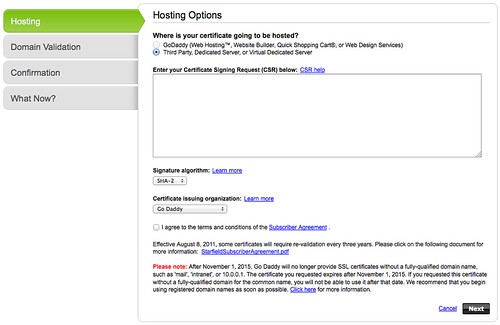
ssl-01

在 Godaddy 購買 Domain Name,接著就來申請 SSL 憑證,依據需求就買了 wildcard certificate 版本。自簽憑證的經驗不少,但是還沒設定過 wildcard 版本 XD

ssl-03

首先先完成 Godaddy 的購買,可以參考 [筆記] SSL 憑證購買記

接著,很快就進入 Godaddy SSL 設定界面,並要求貼上 Certificate Signing Request(CSR) 資料。這邊需留意的是建立 CSR 的過程中,以前在 Common Name 總是輸入完整的 hostname (如 blog.changyy.org),現在要改輸入成 * 開頭(如: *.changyy.org),算是關鍵之處。

$ openssl req -new -newkey rsa:2048 -nodes -keyout wildcard.domainname.key -out wildcard.domainname.csr

最後再把 wildcard.domainname.csr 打開後,複製內文貼上即可進行。

ssl-04

由於是購買 wildcard 版本,如果 common name 不是輸入 * 開頭,會看到錯誤訊息,也是個不錯的防呆。

ssl-06

接著,再切換到下載頁面,就可以挑選屬於自己的 web server 資料。

對於 nginx 的部分,下載回來共有兩個 csr 檔案,對 apache web server 而言,可以分開設定剛剛好,但 nginx 只有 ssl_certificate 跟 ssl_certificate_key 兩個啊,因此,只要把 godaddy 給你的兩個 crt 串起來使用即可:

$ cp xxxx.crt hostname.crt
$ cat gd_bundle-g2-g1.crt >> hostname.crt


接著在 nginx 設定檔中,把 ssl_certificate 填 hostname.crt 而 ssl_certificate_key 則是最早建立 crt 的 key (此例 wildcard.domainname.key)