解法:
<script type="text/javascript" src="/js/jquery-1.11.0.min.js"></script>

<script>

    jQuery.curCSS = jQuery.css;

</script>
雖然解法不是很好 XD 但對於使用 open source 而言,可以降低維護問題,也算是無可厚非的吧。
<script type="text/javascript" src="/js/jquery-1.11.0.min.js"></script>
<script>
jQuery.curCSS = jQuery.css;
</script>
db.collection.find( { property: {$ne: null }} )

db.collection.find( { property: null} )
db.collection.find( { "$where": "this.property && this.property > 1" } )
failed: exception: $where is not allowed inside of a $match aggregation expression
db.collection.aggregate([

 {

  $match: {

   property: { $ne : null }

  }

 },

 {

  $unwind: "$property"

 },

 {

  $group: {

   _id: "$property.name",

   count: {

    $sum: 1

   }

  }

 }


])
{

 "id": "client",
 "date": "date",
 "property":

 [

  { "name": "ios", "version": 1 } ,

  { "name": "android", "version": 1 } ,

  { "name": "ios", "version": 2 }
 ]

}
{ "id": "client", "date": "date", "name": "ios", "version": 1 }

{ "id": "client", "date": "date", "name": "android", "version": 1 }

{ "id": "client", "date": "date", "name": "ios", "version": 2 }
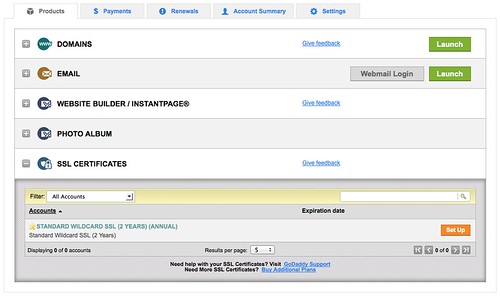
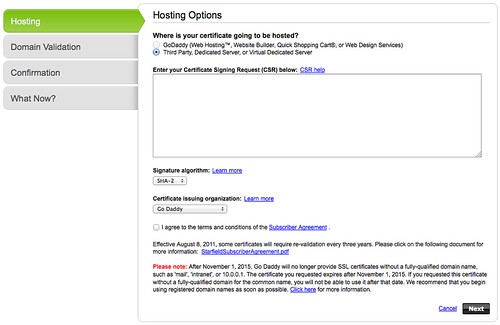
$ openssl req -new -newkey rsa:2048 -nodes -keyout wildcard.domainname.key -out wildcard.domainname.csr
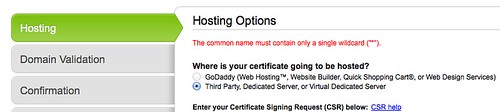
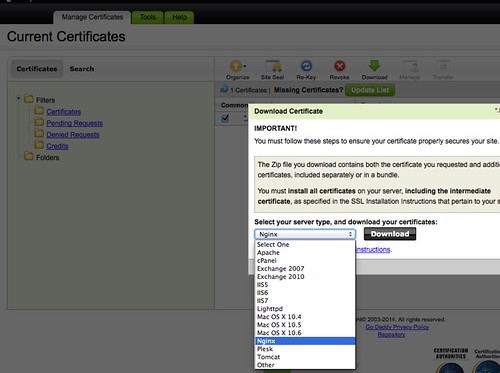
$ cp xxxx.crt hostname.crt
$ cat gd_bundle-g2-g1.crt >> hostname.crtObjectId is a 12-byte BSON type, constructed using:開發環境:MongoDB Server v2.4.9
a 4-byte value representing the seconds since the Unix epoch,
a 3-byte machine identifier,
a 2-byte process id, and
a 3-byte counter, starting with a random value.
mongodb> db.test.aggregate({

 $group:{

  _id: {

   year: { $year: "$_id.getTimestamp()" } ,

   month: { $month: "$_id.getTimestamp()" } ,

   day: { $dayOfMonth: "$_id.getTimestamp()" }

  },

  count: {

   $sum:1

  }

 }

})


mongodb> aggregate failed: {

        "errmsg" : "exception: can't convert from BSON type EOO to Date",

        "code" : 16006,

        "ok" : 0

}
mongodb> db.test.update({timestamp: null }, { $set : { timestamp: _id.getTimestamp() } }, {multi:true})

ReferenceError: _id is not defined
mongodb> db.test.find({timestamp:null}).snapshot().forEach(

 function (item) {

  item.timestamp = item._id.getTimestamp();

  //db.test.save(item);

  db.test.update(

    # query

    {

        '_id': item['_id']

    },

    # update

    {

        '$set':

        {

            'timestamp': item['timestamp']

        }

    },

    upsert=False, multi=False

  );

 }

)
mongodb> db.test.aggregate(

 {

  $group:{

   _id: {

    year: { $year: "$timestamp" } ,

    month: { $month: "$timestamp" } ,

    day: { $dayOfMonth: "$timestamp" }

   },

   count: {

    $sum:1

   }

  }

 }

)

{

        "result" : [

                {

                        "_id" : {

                                "year" : 2014,

                                "month" : 2,

                                "day" : 22

                        },

                        "count" : 23

                },

                {

                        "_id" : {

                                "year" : 2014,

                                "month" : 2,

                                "day" : 21

                        },

                        "count" : 15

                },

                {

                        "_id" : {

                                "year" : 2014,

                                "month" : 2,

                                "day" : 20

                        },

                        "count" : 200

                }

        ],

        "ok" : 1

}
$ sudo apt-get install python-software-properties

$ sudo add-apt-repository ppa:chris-lea/node.js

$ sudo apt-get update

$ sudo apt-get install nodejs
$ cd project

$ npm install mongodb

$ vim test.js

var Db = require('mongodb').Db,

        MongoClient = require('mongodb').MongoClient;


var db_host = 'localhost';

var db_port = 27017;

var auth_db = 'admin';

var auth_name = 'account';

var auth_pass = 'password';


MongoClient.connect("mongodb://"+auth_name+":"+auth_pass+"@"+db_host+":"+db_port, function(err, db) {

        console.log(err);

        console.log(db.databaseName);

        db.close();

});


MongoClient.connect("mongodb://"+db_host+":"+db_port, function(err, db) {

        db.authenticate(auth_name, auth_pass, function(err, ret) {

                console.log(err);

         console.log(db.databaseName);

                console.log(ret);

         db.close();

        });

});


$ node test.js

Failed to load c++ bson extension, using pure JS version

null

admin

null

admin

true
{ [MongoError: unauthorized] name: 'MongoError', ok: 0, errmsg: 'unauthorized' }
