2014年1月28日 星期二

[OSX] 使用 Mac OS X 內建 Mail app 收信筆記(UTF-8, Auto bcc) @ Mac 10.9

約莫用了快一個月收信了,其中 mail server 是 Microsoft Exchange 系統,有一些筆記:

自動密件自己(auto bcc):

新增:
$ defaults write com.apple.mail UserHeaders "{'Bcc'='myemail@domain.local’;}”


顯示:
$ defaults read com.apple.mail UserHeaders
{
    Bcc = "myemail@domain.local";
}

刪除:
$ defaults delete com.apple.mail UserHeaders


強制 UTF-8 編碼:

由於其他人常用 Outlook 收信,會發現他們的 outlook 無法判斷編碼(但 Webmail 顯示正常),解法就是在信件內容加上 UTF-8 特殊符號即可,例如擺在簽名檔等:

✉ : email@local.com

2014年1月26日 星期日

[OSX] 使用 ffmpeg 將 mp4 list 依序串接起來 (ffmpeg concat) @ Mac OS X 10.9

最近研究了一下對岸的影音播放,發現有的服務實作時,將一部短片以固定時間進行切割,這樣在服務眾人或是走 P2P 時,可以很方便進行分流,然而,若要把它弄成一個檔案,那就得花點功夫了,好家在用 ffmpeg 就可以搞定囉:How to concatenate (join, merge) media files

以 mp4 為例:

$ ffmpeg -i file1.mp4 -c copy -bsf:v h264_mp4toannexb -f mpegts '/tmp/tmp1'
$ ffmpeg -i file2.mp4 -c copy -bsf:v h264_mp4toannexb -f mpegts '/tmp/tmp2'
$ ffmpeg -i "concat:/tmp/tmp1|/tmp/tmp2" -c copy -bsf:a aac_adtstoasc output.mp4


接著,嫌太慢就寫個 script 來處理 XDD

$ python ffmpeg-concat-mp4-files.py --files file1.mp4 file2.mp4 --output out.mp4
$ python ffmpeg-concat-mp4-files.py --m3u /tmp/m3u.list --output out.mp4


其中 m3u 是支援 http 的描述,也就是會把網路上的東西用 wget 下載回 tmp 區。因此 ffmpeg-concat-mp4-files.py 需要有 ffmpeg 跟 wget 指令才能。

2014年1月25日 星期六

[Firefox] 把玩 Firefox 擴充套件 - 以 youku_enable_fx 為例

這周被派去研究如何取得對岸影片等問題,解法不就 Proxy、VPN 等,過程中有看到一個很特別的套件:lonelyeagle / youku_enable_fx ,這是 Firefox 擴充套件。

說到 Firefox 嘛,對我而言,很妙地也接近"退役"階段,大概我離開前端開發好一陣子,除了不需用 firebug 外,連現況 Google Chrome 的開發者工具已經非常夠用,所以 Firefox 就接近被我當作"測試用途"的瀏覽器,包含 cookie、history 都設定成不儲存,十分方便。

研究了一下 youku_enable_fx 的做法,其實概念就兩點:

  • 對特定 url requests 攔截
  • 特定 requests 導向指定的 proxy server

如此,就可能巧妙地"欣賞"對岸鎖 IP 的影片了。

至於製作 Firefox extension 的部分,這個文件寫的滿清楚的:如何製作 Firefox 擴充套件。因此,只需把 lonelyeagle / youku_enable_fx 取出後,進行 zip 壓縮即可。

$ cd /tmp
$ git clone https://github.com/lonelyeagle/youku_enable_fx.git
$ cd youku_enable_fx

$ zip -r youku_enable_fx.xpi install.rdf chrome.manifest defaults/* chrome/*
  adding: install.rdf (deflated 51%)
  adding: chrome.manifest (deflated 52%)
  adding: defaults/preferences/ (stored 0%)
  adding: defaults/preferences/prefs.js (deflated 50%)
  adding: chrome/content/ (stored 0%)
  adding: chrome/content/ff-overlay.js (deflated 64%)
  adding: chrome/content/ff-overlay.xul (deflated 46%)
  adding: chrome/locale/ (stored 0%)
  adding: chrome/locale/en-US/ (stored 0%)
  adding: chrome/locale/en-US/overlay.dtd (deflated 62%)
  adding: chrome/locale/en-US/overlay.properties (deflated 25%)
  adding: chrome/skin/ (stored 0%)
  adding: chrome/skin/overlay.css (deflated 57%)
  adding: chrome/skin/unblockPlayer.png (deflated 0%)


產出 youku_enable_fx.xpi 啦,把他拖進 firefox 即可安裝,安裝完記得重啟 firefox 才可以啟用。
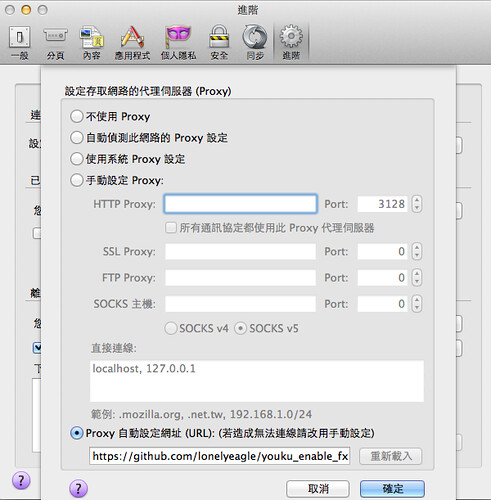
enable_youku_fx

安裝完 youku_enable_fx.xpi 後,在調整 proxy 位置:

  • https://github.com/lonelyeagle/youku_enable_fx/raw/master/youku_enable.pac
  • http://yo.uku.im/proxy.pac

如此一來,就可以用了 :P

2014年1月24日 星期五

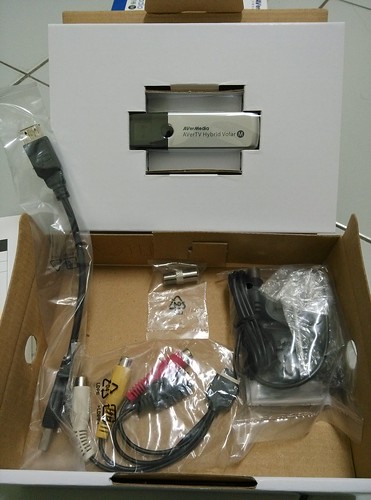
圓剛 H830M 三頻電視棒

H830M-01

準備回家過年了,剛好老鄉只有一台電視可用,想著想著,就乾脆買了一隻電視棒來用 XD 原本還想在 raspberry pi 架個 streaming server 的,也著手找尋有提供 Linux driver 的電視棒,但不知不覺發現有支援 Mac OS X 的,剛好有特價!?不知不覺手就滑了 XDDD

試了一下,這支電視棒的最大缺點可能是沒有遙控器 XD 但如果是重度的 Apple 派,或許可以用 Apple Remote ?

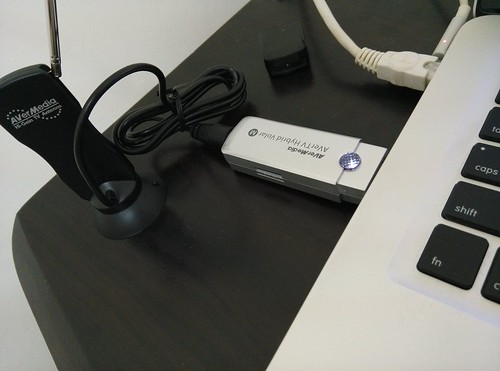
H830M-02

至於優點就是三頻(數位電視、有線電視、廣播)、體積小、支援 Mac OS X 吧!另外有送一隻小天線。哪天在外頭沒網路又想看電視、聽廣播時,可以拿出來用用吧!


H830M-04

[MongoDB] 使用 PyMongo 把玩 MapReduce @ Ubuntu 12.04

稍微接觸了一下 MongoDB 後,對此感到無比的興奮?與 Hadoop 相比,感覺上手度滿高的,不過,使用 PyMongo 的情況下,還是需要比較適合熟悉 Javascript 的人,因為 Mapper 跟 Reducer 的撰寫仍是用 Javascript 的,更正確來說是 BSON's JavaScript code type.

既然是 MapReduce,那就先來個 word count 吧!說真的,word count 也是我學 Hadoop 時跑的第一個範例。

簡單試了一下(文字來源:Taiwan wiki - Names):

$ python import.py -
{"field":"There are various names for the island of Taiwan in use today, derived from explorers or rulers by each particular period. The former name Formosa (福爾摩沙) dates from 1544, when Portuguese sailors sighted the main island of Taiwan and named it Ilha Formosa, which means \"Beautiful Island\".[21] In the early 17th century, the Dutch East India Company established a commercial post at Fort Zeelandia (modern Anping, Tainan) on a coastal islet called \"Tayouan\" in the local Siraya language; the name was later extended to the whole island as \"Taiwan\".[22] Historically, \"Taiwan\" has also been written as 大灣, 臺員, 大員, 臺圓, 大圓 and 臺窩灣."}
{"field":"The official name of the state is the \"Republic of China\"; it has also been known under various names throughout its existence. Shortly after the ROC's establishment in 1912, while it was still located on the Asian mainland, the government used the abbreviation \"China\" (\"Zhongguó\") to refer to itself. During the 1950s and 1960s, it was common to refer to it as \"Nationalist China\" (or \"Free China\") to differentiate it from \"Communist China\" (or \"Red China\").[23] It was present at the UN under the name \"China\" until 1971, when it lost its seat to the People's Republic of China. Since then, the name \"China\" has been commonly used internationally to refer only to the People's Republic of China.[24] Over subsequent decades, the Republic of China has become commonly known as \"Taiwan\", after the island that composes most of its territory. The Republic of China participates in most international forums and organizations under the name \"Chinese Taipei\" due to diplomatic pressure from the PRC. For instance, it is the name under which it has competed at the Olympic Games since 1984, and its name as an observer at the World Health Organization.[25]"}
Import:  2
[ObjectId('52e265a69c3fe514be2534fe'), ObjectId('52e265a69c3fe514be2534ff')]


$ python map-reduce-word-count.py --show-result --delete-result
Collection(Database(MongoClient('localhost', 27017), u'db'), u'tmp_2014-01-24_131025')
{u'_id': u'1544', u'value': {u'count': 1.0}}
{u'_id': u'17th', u'value': {u'count': 1.0}}
{u'_id': u'1912', u'value': {u'count': 1.0}}
{u'_id': u'1950s', u'value': {u'count': 1.0}}
{u'_id': u'1960s', u'value': {u'count': 1.0}}
{u'_id': u'1971', u'value': {u'count': 1.0}}
{u'_id': u'1984', u'value': {u'count': 1.0}}
{u'_id': u'21', u'value': {u'count': 1.0}}
{u'_id': u'22', u'value': {u'count': 1.0}}
{u'_id': u'23', u'value': {u'count': 1.0}}
{u'_id': u'24', u'value': {u'count': 1.0}}
{u'_id': u'25', u'value': {u'count': 1.0}}
{u'_id': u';', u'value': {u'count': 1.0}}
{u'_id': u'Anping', u'value': {u'count': 1.0}}
{u'_id': u'Asian', u'value': {u'count': 1.0}}
{u'_id': u'Beautiful', u'value': {u'count': 1.0}}
{u'_id': u'China', u'value': {u'count': 12.0}}
{u'_id': u'Chinese', u'value': {u'count': 1.0}}
{u'_id': u'Communist', u'value': {u'count': 1.0}}
{u'_id': u'Company', u'value': {u'count': 1.0}}
{u'_id': u'During', u'value': {u'count': 1.0}}
{u'_id': u'Dutch', u'value': {u'count': 1.0}}
{u'_id': u'East', u'value': {u'count': 1.0}}
{u'_id': u'For', u'value': {u'count': 1.0}}


其中 mongodb-study/blob/master/tools/import.py 只是把資料輸入到 mongodb 中,預設 database = db, collection = test。比較重要的 mapper, reducer 則是寫在 mongodb-study/blob/master/tools/map-reduce-word-count.py 程式中。

而 map-reduce-word-count.py 中,比較重要的則是 mapper 與 reducer 的定義,雖然是用 pymongo ,但這邊仍是用 Javascript 描述的,這大概是 pymongo 的最大缺點吧?印象中翻到 Java 版的 MongoDB 操作,可直接用 Java 來撰寫,這點影響還滿大的,簡言之,用 Pymongo 要撰寫 mapper、reducer 就是得先會一點 Javascript 才行。

使用 pymongo 撰寫 mapper 的方式,有一個小提醒就是 this.field 等於可以取到原先 input 的資料,但是,這邊的 this.field 需要強制轉型,這樣才能接著用 split 切字出來,另外,也可以自定 func 來呼叫使用,如此一來,就變成只剩字串處理的技巧了 :)

mapper = Code (
"""
function() {
var func = {
'author':function() {
return 'changyy';
}
};
(“”+this.field).split(/[\s\[\],\(\)"\.]+/).forEach(function(v){
//emit(func.author(), 1 );
if(v && v.length )
emit(v, {'count':1});
} );
}
"""
)


reducer = Code(
"""
function(key, value) {
var total = 0;
for(var i = 0 ; i < value.length ; ++i ) {
total += value[i].count;
}
return {'count':total};
}
"""
)