VLC Player -> 工具 -> 偏好設定:
- 預設編碼: UTF-8
- 字型:Microsoft YaHei
一開始以為換編碼就行了,接著以為字型換中文(細明體)的就行了,最後還是上網查別人的招數,竟然連字型也是個關鍵 Orz
for (int i=0 ; i< [[UIFont familyNames] count]; ++i) {

        NSLog(@"Font Family: %@", [UIFont familyNames][i]);

        for (int j=0; j<[[UIFont fontNamesForFamilyName:[UIFont familyNames][i]] count] ; ++j) {

            NSLog(@"Font Name: %@", [UIFont fontNamesForFamilyName:[UIFont familyNames][i]][j]);

        }

}
NSString *words = @"Hello World!";

for (int i=0 ; i< [[UIFont familyNames] count]; ++i) {

    //NSLog(@"Font Family: %@", [UIFont familyNames][i]);

    for (int j=0; j<[[UIFont fontNamesForFamilyName:[UIFont familyNames][i]] count] ; ++j) {

        //NSLog(@"Font Name: %@", [UIFont fontNamesForFamilyName:[UIFont familyNames][i]][j]);


        float width = -1 ;

        bool found = true;

        for (int k=0; k< [words length]; ++k) {

            unichar word = [words characterAtIndex:k];

            CGSize wordSize = [[NSString stringWithFormat:@"%C", word] sizeWithAttributes:@{

                NSFontAttributeName: [UIFont fontWithName:[UIFont fontNamesForFamilyName:[UIFont familyNames][i]][j] size:16]

            }];

            if (width < 0) {

                width = wordSize.width;

            } else if (width != wordSize.width) {

                found = false;

                break;

            }

        }

        if (found) {

            NSLog(@"width(size16): %f, monospaced font: %@", width, [UIFont fontNamesForFamilyName:[UIFont familyNames][i]][j]);

        }

    }

}
    NSString *words = @"Hello World! 您好!";

    for( int i=0 ; i<[words length] ; ++i ) {

        unichar word = [words characterAtIndex:i];

        CGSize wordSize = [[NSString stringWithFormat:@"%C", word] sizeWithAttributes:nil];

        NSLog(@"Char: %C, Font Width: %f", word, wordSize.width);

    }
Char: H, Font Width: 8.666016

Char: e, Font Width: 6.673828

Char: l, Font Width: 2.666016

Char: l, Font Width: 2.666016

Char: o, Font Width: 6.673828

Char:  , Font Width: 3.333984

Char: W, Font Width: 11.326172

Char: o, Font Width: 6.673828

Char: r, Font Width: 3.996094

Char: l, Font Width: 2.666016

Char: d, Font Width: 6.673828

Char: !, Font Width: 3.333984

Char:  , Font Width: 3.333984

Char: 您, Font Width: 12.000000

Char: 好, Font Width: 12.000000

Char: !, Font Width: 12.000000
@{

    NSFontAttributeName: [UIFont fontWithName:@"Courier" size:16]

}
Char: H, Font Width: 9.601562

Char: e, Font Width: 9.601562

Char: l, Font Width: 9.601562

Char: l, Font Width: 9.601562

Char: o, Font Width: 9.601562

Char:  , Font Width: 9.601562

Char: W, Font Width: 9.601562

Char: o, Font Width: 9.601562

Char: r, Font Width: 9.601562

Char: l, Font Width: 9.601562

Char: d, Font Width: 9.601562

Char: !, Font Width: 9.601562

Char:  , Font Width: 9.601562

Char: 您, Font Width: 16.000000

Char: 好, Font Width: 16.000000

Char: !, Font Width: 16.000000
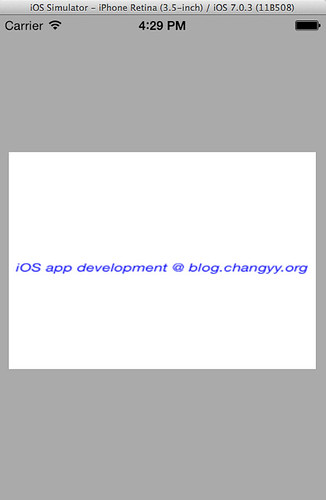
+ (UIImage *)buildImageAndDrawText:(NSString *)text size:(CGSize)size ios7:(BOOL)iOS7SDK

{

    UIGraphicsBeginImageContext(size);

    CGContextRef context = UIGraphicsGetCurrentContext();

    CGContextSetRGBFillColor(context, 1, 1, 1, 1);

    CGContextFillRect(context, CGRectMake(0, 0, size.width, size.height));


    UIFont *font = [UIFont italicSystemFontOfSize:15];

    UIColor *fontColor = [UIColor blueColor];


    if (iOS7SDK) {

        NSMutableParagraphStyle *paragrapStyle = [[NSMutableParagraphStyle alloc] init];

        [paragrapStyle setLineBreakMode:NSLineBreakByWordWrapping];

        [paragrapStyle setAlignment:NSTextAlignmentCenter];


        [text drawInRect:CGRectIntegral(CGRectMake(0, size.height/2, size.width, size.height))

          withAttributes:@{

                           NSParagraphStyleAttributeName: paragrapStyle,

                           NSFontAttributeName: font,

                           NSForegroundColorAttributeName: fontColor}

         ];

    } else {

        [fontColor set];

        [text drawInRect:CGRectIntegral(CGRectMake(0, size.height/2, size.width, size.height)) withFont:font lineBreakMode:NSLineBreakByWordWrapping alignment:NSTextAlignmentCenter];

    }


    UIImage *outImage = UIGraphicsGetImageFromCurrentImageContext();

    UIGraphicsEndImageContext();

    return outImage;

}
self.imageView = [YourClass buildImageAndDrawText:@"iOS app development @ blog.changyy.org" size:CGSizeMake(300, 300) ios7:YES];
