2015年10月3日 星期六

iOS 開發筆記 - 下載舊版 Simulator,如 iOS 8 Simulator

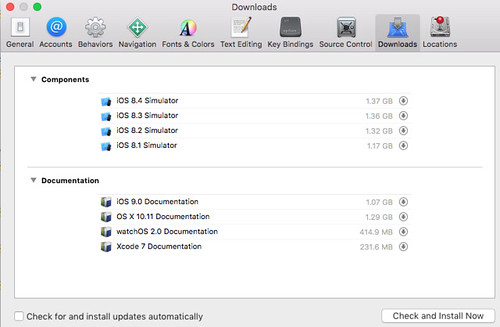
Download iOS Simulator

記得很久以前,我還有把 Xcode 3,4 系列燒成光碟,為的就是舊版 simulator,後來不知不覺就都不需要,甚至把玩 app 都直接用最新版 iOS siumulator 跟 sdk 了。不過這次 iOS 9 跟 iOS 8 有一些 layout 問題,所以還是找一下舊版 simulator 吧!

Xcode -> Preferences -> Downloads 或是 iOS Simulator -> Hardware -> Device -> Manage Devices -> 左下角 + -> iOS Version -> Download more simulators 。

此外,有人說在 OS X EI Capitan 已不支援 iOS 7 Simulator 了 :P 所以在此版本的作業系統下載不到。

另外一提,安裝 Simulator 需要用高級權限 Orz 不然會有以下訊息:

Cloud not download and install iOS 8.x Simulator.

高級權限的方式:

sudo /Applications/Xcode.app/Contents/MacOS/Xcode

iOS 開發筆記 - iOS9 存取外部資源失敗與解決方式 (App Transport Security & Info.plist & URL Scheme)

iOS 9 引入了外部資源存取的限制(App Transport Security),例如 App 操作過程中,對網路上的資料發送 requests 要求資料時,會被擋下來。這個影響的範圍滿廣的,例如做 QRCode app 時,掃描到 URL 時,開啟 UIWebView 卻無法瀏覽,或是在 UIWebView 呈現網頁時,塞一個 <img> tag 進去卻顯示不出來。

類似錯誤訊息:
  • App Transport Security has blocked a cleartext HTTP (http://) resource load since it is insecure. Temporary exceptions can be configured via your app's Info.plist file.
  • NSURLSession/NSURLConnection HTTP load failed (kCFStreamErrorDomainSSL, -9802)
若有用 FB SDK ,也會出現:
  • FBSDKLog: WARNING: FBSDK secure network request failed. Please verify you have configured your app for Application Transport Security compatibility described at https://developers.facebook.com/docs/ios/ios9
解法就是設定 Info.plist,在 iOS9 多了個 NSAppTransportSecurity 項目可以設定,可以參考 FB SDK 文件( https://developers.facebook.com/docs/ios/ios9 ),若 App 無法限制存取的來源(像QRCode App),那只好設定 NSAllowsArbitraryLoads = YES 啦

此外,對於判斷 URL Scheme 也是個問題,例如常見判斷 JB 的方式:

[[UIApplication sharedApplication] canOpenURL:[NSURL URLWithString:@"cydia://package/com.example.package"]]

也有類似的資源限制問題:

-canOpenURL: failed for URL: "cydia://package/com.example.package" - error: "This app is not allowed to query for scheme cydia"

這時也得設定 LSApplicationQueriesSchemes 參數來處理,設定完會變成:

-canOpenURL: failed for URL: "cydia://package/com.example.package" - error: "(null)"

iOS 開發筆記 - UITableViewCell 在 iOS9 的環境中,預設沒有佔滿 UITableView Width

假設 UITableView 的寬度有 768,但 UITableViewCell 拿不到 768 ,導致用程式計算的排版會出錯,且連 titleForHeaderInSection 顯示也一樣,追了一下應該是 Margin 效果

https://developer.apple.com/library/prerelease/ios/documentation/UIKit/Reference/UITableView_Class/#//apple_ref/occ/instp/UITableView/cellLayoutMarginsFollowReadableWidth

偷懶解法:

if([self.tableView respondsToSelector:@selector(setCellLayoutMarginsFollowReadableWidth:)])
self.tableView.cellLayoutMarginsFollowReadableWidth = NO;

2015年9月27日 星期日

[GO] 使用 Go drive 同步資料至 Google Drive 空間 @ Ubuntu 14.04 64bit

之前默默地得到 Google for edu 的帳號,想說該善用一下空間。之前比較常用 Dropbox 的空間,所以一直沒善用 Google Drive ,但是埋在 Linode 1GB 機器上,常常覺得記憶體都被 Dropbox 吃光,這次就試試 Google drive 吧!有 1TB 的空間,就拿來備份服務產生的資料了 cc

接著,找了很久,才發現有一個用 Go 語言寫的 Google drive 指令,接著想說用 apt-get 安裝 go 語言,結果版本不夠新,又找了 gvm 來試試,總之,流程如下:
  1. 安裝 gvm
  2. 安裝編譯 golang 所需套件
  3. 安裝 drive
  4. 編輯 .bashrc 環境變數
  5. 初始化 google drive
  6. 上傳資料至 google drive
連續動作:

$ bash < <(curl -s -S -L https://raw.githubusercontent.com/moovweb/gvm/master/binscripts/gvm-installer)
$ gvm install go1.5 --binary
$ vim .bashrc
export GOPATH="$HOME/go-package”
export PATH=$PATH:$GOPATH/bin
$ go get -u github.com/odeke-em/drive/cmd/drive
$ mkdir $HOME/gdrive
$ drive init $HOME/gdrive


未來在 $HOME/gdrive 建立完資料,可以用 drive push path 來進行上傳到 Google Drive。接著就偷懶把指令擺在 crontab 啦,要留意 gvm 的使用,如:

*/20    *       *       *       *       bash -c 'source $HOME/.gvm/scripts/gvm && gvm use go1.5 && cd $HOME/gdrive && drive push -no-prompt -quiet test_auto_upload_dir/‘ > /dev/null

同理,若真的要做到 sync 的話,可以再用 drive pull test_auto_upload_dir 來更新更動,而把 sync 動作切該成 drive push 跟 drive pull 也有好處,例如可製作永遠上傳至 google drive 的功能,同時也能定期刪掉已上傳過的資料!

2015年9月3日 星期四

iOS 開發筆記 - Push Notification 收到 SSL operation failed with code 1. OpenSSL Error messages: error:1409F07F:SSL routines:SSL3_WRITE_PENDING:bad write retry 和 SSL Broken

網路上的一些討論:

  • get SSL Broken pipe error when try to make push notification - http://stackoverflow.com/questions/2626054/get-ssl-broken-pipe-error-when-try-to-make-push-notification
  • APNS SSL operation failed with code 1 - http://stackoverflow.com/questions/18378534/apns-ssl-operation-failed-with-code-1
簡言之,批次處理發訊動作時,其中有一個 notification token 失效時,會導致與 Apple Notification Server 的連線中斷 Orz 例如發 500 個,其中第二個壞了,會導致後面 498 個無法使用前一次的連線,要記得處理一下。解法就是要去偵測連線是否中斷,一旦中斷後要重連。