2014年7月3日 星期四

iOS 開發筆記 - 使用 C++ Source Code

最近把玩練習時,想說用一下 CPP 的,寫完後發現要整進 Xcode 卻發現 compile error,例如在 AppDelete.m 中:

#include "Test.h"

- (BOOL)application:(UIApplication *)application didFinishLaunchingWithOptions:(NSDictionary *)launchOptions
{
    // Override point for customization after application launch.
 
    Test *obj = new Test();
 
    return YES;
}


其中 Test.h:

#ifndef __Test__Test__
#define __Test__Test__

#include <iostream>

class Test {
public:
    int x;
};


#endif /* defined(__Test__Test__) */


編譯時就會顯示找不到 iostream 等訊息,解法?早期大概有指定 Compile 參數,現在還滿容易的,只要把用到 CPP 的 Objective-C 檔案,從 .m 改成 .mm 即可。

以此就是將 AppDelete.m 更名為 AppDelete.mm ,就可以編譯成功,真是太方便了!

[Linux] 使用 wget 測試 Remote Resource Availability @ Ubuntu 14.04

wget 有 --spider 模式,挺方便的 :P

$ wget --spider http://www.google.com/favicon.ico
Spider mode enabled. Check if remote file exists.
Resolving www.google.com (www.google.com)... 173.194.33.148, 173.194.33.144, 173.194.33.145, ...
Connecting to www.google.com (www.google.com)|173.194.33.148|:80... connected.
HTTP request sent, awaiting response... 200 OK
Length: unspecified [image/x-icon]
Remote file exists.

2014年7月2日 星期三

[Linux] 使用 ClamAV 掃毒 @ Ubuntu 14.04 Server

有一台Linode機器一直用來當跳板,若沒出事就不會進去逛,最近突然想到,不會不哪天被入侵還不知道?就先試看看最粗淺的用法,掃毒:

$ sudo apt-get install clamav
$ sudo freshclam
$ sudo clamscan -r /
...

----------- SCAN SUMMARY -----------
Known viruses: 3492457
Engine version: 0.98.1
Scanned directories: 13386
Scanned files: 50860
Infected files: 0
Total errors: 8826
Data scanned: 1996.67 MB
Data read: 19701.90 MB (ratio 0.10:1)
Time: 210.216 sec (3 m 30 s)

$ df -h
Filesystem      Size  Used Avail Use% Mounted on
/dev/xvda        47G   20G   25G  44% /
none            4.0K     0  4.0K   0% /sys/fs/cgroup
devtmpfs        996M  4.0K  996M   1% /dev
none            200M  208K  200M   1% /run
none            5.0M     0  5.0M   0% /run/lock
none            997M     0  997M   0% /run/shm
none            100M     0  100M   0% /run/user


看起來耗時不多,有沒有用就是另一回事了 XDD 例如躲在記憶體內以及沒被偵測出來的...

2014年7月1日 星期二

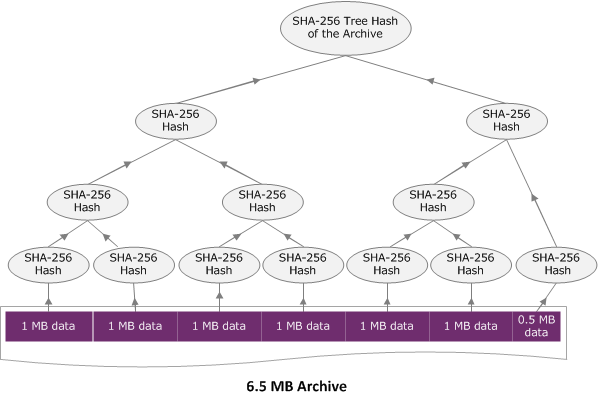
[Python] SHA256 Tree Hash @ Ubuntu 14.04

來源:AWS Computing Checksums

最近在用 AWS Glacier 備份資料時,發現 AWS 回傳的 SHA Checksum 的數值跟系統內建的 sha25sum 不一致,而 AWS Computing Checksums 有提供 Java 跟 C# 版本,因為邏輯很簡單,就順手刻一個 Python 版本:changyy/aws-glacier-sha256-tree-hash


iOS 開發筆記 - 使用自定字型


用法:
  1. 將字形(MyCustomFontName.ttf)拖進Supporting Files,記得要勾選 "Add to tagets"

  2. 更新 *.plist 資訊,新增 Fonts provided by application,新增剛剛添加的字型檔名(含副檔名)
  3. 簡易使用 NSLog(@"MyCustomFont: %@", [UIFont fontWithName:@"MyCustomFontName" size:12]);  ,不需副檔名,若 NSLog 輸出不是 null 即可。