顯示具有 text 標籤的文章。 顯示所有文章

2016年12月3日 星期六

[C] 使用 SQLite - sqlite3_bind_text 之 value 一直配對(綁定)錯誤

最近整理兩年前的程式,一直有空時會重構,由於時間拉太長了,我已不記得改過什麼,又懶得看 git log,就這樣東摸摸西摸摸,最後發現 bug 了。

有一張表:

CREATE TABLE IF NOT EXISTS test (
id INTEGER PRIMARY KEY AUTOINCREMENT,
data TEXT NOT NULL
);


接著,不斷新增資料,並且透過 sqlite3_bind_text 維護:

INSERT OR IGNORE INTO test (data) VALUES (?),(?),(?)

然而,透過 sqlite3_bind_text 綁定時,一直出錯,起初以為是 UTF-8 問題,但早期程式也沒問題,透過觀察,發現記憶體不如預期,追了好一陣子,發現是 sqlite3_bind_text 的參數問題 Orz

https://www.sqlite.org/c3ref/c_static.html
Constants Defining Special Destructor Behavior

typedef void (*sqlite3_destructor_type)(void*);
#define SQLITE_STATIC      ((sqlite3_destructor_type)0)
#define SQLITE_TRANSIENT   ((sqlite3_destructor_type)-1)


原因在於我一直用 SQLITE_STATIC 啦,但我的結構已經是 std::vector<std::unordered_map<std::string, std::string>> values 這種稍微複雜的,並且透過 iterator 不斷變換資料,因此,必須改用 SQLITE_TRANSIENT 才對。

std::vector<std::unordered_map<std::string, std::string>> values;
std::vector<std::string> fields ({ "data" });
for (auto item : values) {
for (auto field: fields) {
if (item.find(field) != item.end()) {
if (SQLITE_OK != sqlite3_bind_text(stmt, i, item[field].c_str(), -1, SQLITE_TRANSIENT)) {
}
} else {
if (SQLITE_OK != sqlite3_bind_null(stmt, i)) {
}
}
}
}


最後還是埋了個 gtest 定期測試了。

2014年6月30日 星期一

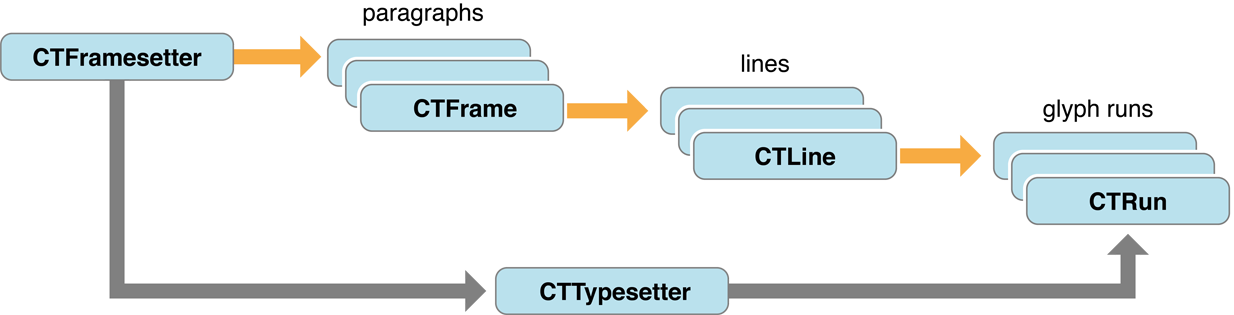
iOS 開發筆記 - 初探 Core Text 架構:paragraphs, lines, glyph runs and glyph


Core Text is an advanced, low-level technology for laying out text and handling fonts. The Core Text API, introduced in Mac OS X v10.5 and iOS 3.2, is accessible from all OS X and iOS environments.

先搞懂 String 在 iOS 系統內是如何被畫到 UIView 上頭:
CTFramesetter -> CTFrame (paragraphs) -> CTLine (lines) -> CTRun (glyph runs)
簡易的範例:

NSString *utf8String = @"0你1我2他";
NSAttributedString *attrString = [[NSAttributedString alloc] initWithString:utf8String];
CTLineRef line = CTLineCreateWithAttributedString((CFMutableAttributedStringRef) attrString);
CFIndex glyphLength = CTLineGetGlyphCount(line);
CFArrayRef runArray = CTLineGetGlyphRuns(line);
CFIndex runArrayLength = CFArrayGetCount(runArray);

for (CFIndex runIndex = 0; runIndex < runArrayLength; runIndex++) {
CTRunRef run = (CTRunRef) CFArrayGetValueAtIndex(runArray,  runIndex);
CTFontRef runFont = CFDictionaryGetValue(CTRunGetAttributes(run), kCTFontAttributeName);
for (CFIndex runGlyphIndex = 0; runGlyphIndex < CTRunGetGlyphCount(run); runGlyphIndex++) {
CFRange thisGlyphRange = CFRangeMake(runGlyphIndex, 1);
CGGlyph glyph;
CGPoint position;
CTRunGetGlyphs(run, thisGlyphRange, &glyph);
CTRunGetPositions(run, thisGlyphRange, &position);

//CGContextShowGlyphsAtPositions(context, &glyph, &position, 1);
}
}

NSLog(@"intput: %lu, runArrayLength: %@, glyphLength:%@", [utf8String length], @(runArrayLength), @(glyphLength));


結果:

intput: 6, runArrayLength: 6, glyphLength:6

其中每一個 run 代表同一個 attributed string ,此例數字、中文交替,所以共有 6 個 run。另一個例子:

NSString *utf8String = @"0你1我我2他";
intput: 7, runArrayLength: 6, glyphLength:7


由於有兩個"我"在同一個 run 中,所以只有 6 個 run。