顯示具有 debug 標籤的文章。 顯示所有文章

2019年1月31日 星期四

iOS 開發筆記 - [BoringSSL] nw_protocol_boringssl_input_finished, boringssl_context_alert_callback_handler, boringssl_session_errorlog, boringssl_session_handshake_error_print 處理方式

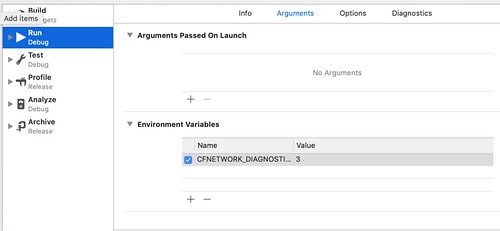
CFNETWORK_DIAGNOSTICS=3

看到以下訊息,完全摸不著頭緒:

[BoringSSL] nw_protocol_boringssl_input_finished(1543) [C294.1:2][0x11f2823d0] Peer disconnected during the middle of a handshake. Sending errSSLClosedNoNotify(-9816) alert
TIC TCP Conn Failed [294:0x2812a5a40]: 3:-9816 Err(-9816)
[BoringSSL] nw_protocol_boringssl_input_finished(1543) [C295.1:2][0x108589540] Peer disconnected during the middle of a handshake. Sending errSSLClosedNoNotify(-9816) alert
TIC TCP Conn Failed [295:0x2812d0540]: 3:-9816 Err(-9816)
[BoringSSL] boringssl_context_alert_callback_handler(3724) [C296.1:2][0x108450060] Alert level: fatal, description: inappropriate fallback
[BoringSSL] boringssl_session_errorlog(224) [C296.1:2][0x108450060] [boringssl_session_handshake_incomplete] SSL_ERROR_SSL(1): operation failed within the library
[BoringSSL] boringssl_session_handshake_error_print(205) [C296.1:2][0x108450060] 4838922792:error:1000043e:SSL routines:OPENSSL_internal:TLSV1_ALERT_INAPPROPRIATE_FALLBACK:/BuildRoot/Library/Caches/com.apple.xbs/Sources/boringssl/boringssl-109.230.1/ssl/tls_record.cc:586:SSL alert number 86
[BoringSSL] boringssl_context_get_error_code(3617) [C296.1:2][0x108450060] SSL_AD_INAPPROPRIATE_FALLBACK
TIC TCP Conn Failed [296:0x2812d0a80]: 3:-9860 Err(-9860)
NSURLSession/NSURLConnection HTTP load failed (kCFStreamErrorDomainSSL, -9860)
Task <FAB06FFC-73C2-48D8-AAEA-750F2FCF1969>.<0> HTTP load failed (error code: -1200 [3:-9860])
NSURLConnection finished with error - code -1200


最後拜讀 StackOverflow - XCode 9 iOS 11 BoringSSL SSL_ERROR_ZERO_RETURN 可以定義 CFNETWORK_DIAGNOSTICS = 3 數值來 debug,並透過 Xcode's scheme 管理環境變數即可,收工!

2015年4月9日 星期四

iOS 開發筆記 - Terminating app due to uncaught exception 'NSInvalidArgumentException', reason: '*** -[__NSPlaceholderArray initWithObjects:count:]: attempt to insert nil object from objects[0]'

閒暇時,追了這個 bug 很久...

主因是 source code 又沒看到 NSPlaceholderArray 關鍵字,最後才發現這是只是單純的 NSArray 相關更動事件。

要找的關鍵處有幾個:
  • [arrayObject addObject:object];
  • [arrayObject addObjectsFromArray:arrayObject];
  • [NSArray arrayWithObject:object];
  • ...
結果漏了一個生成 NSArray 很好用的語法:
  • @[]
出包之處就是 @[] 相關動作啦,例如 @[obj1, obj2, obj3]; 其中有個 object 是 nil 啦

2014年11月25日 星期二

[PHP] 使用 CodeIgniter 和 codeigniter-restserver 建立 RESTful API 以及測試方式 @ Ubuntu 14.04

環境資訊:

  • Ubuntu 14.04 64 Bit (lsb_release -a)
  • PHP 5.5.9 (php -v)
  • CodeIgniter 2.2.0 (echo CI_VERSION)

接著,透過 github.com/chriskacerguis/codeigniter-restserver 擴充 CodeIgniter:

$ wget https://raw.githubusercontent.com/chriskacerguis/codeigniter-restserver/master/application/config/rest.php -O /path/ci_proj/application/config/rest.php

$ wget https://raw.githubusercontent.com/chriskacerguis/codeigniter-restserver/master/application/libraries/Format.php -O /path/ci_proj/application/libraries/Format.php

$ wget https://raw.githubusercontent.com/chriskacerguis/codeigniter-restserver/master/application/libraries/REST_Controller.php -O /path/ci_proj/application/libraries/REST_Controller.php


接著,請確認 application/config/rest.php 設定:

$config[rest_default_format] = 'json'; // 預設為 xml

之後,就可以撰寫簡單的 RESTful API 啦:

<?php if ( ! defined('BASEPATH')) exit('No direct script access allowed');
require(APPPATH.'/libraries/REST_Controller.php');

class Item extends REST_Controller {
        public function index_get() {
                $this->list_get();
        }
        public function index_post() {
                $this->add_post();
        }
        public function index_put() {
                $this->update_put();
        }
        public function index_delete() {
                $this->delete_delte();
        }

        public function list_get() {
                echo "list";
        }
        public function add_post() {
                echo "create";
        }
        public function update_put() {
                echo "put";
        }
        public function remove_delete() {
                echo "remove";
        }
}


測試方式:

取得清單(GET)

$ curl -X GET http://localhost/ci_proj/item/list
$ curl -X GET http://localhost/ci_proj/item/

新增資料(POST)

$ curl -X POST http://localhost/ci_proj/item/add
$ curl -X POST http://localhost/ci_proj/item/


更新資料(PUT)

$ curl -X PUT http://localhost/ci_proj/item/update
$ curl -X PUT http://localhost/ci_proj/item/


刪除資料(DELETE)

$ curl -X DELETE http://localhost/ci_proj/item/delete
$ curl -X DELETE http://localhost/ci_proj/item/


也可以用 wget --method GET/POST/PUT/DELETE 等進行測試。

至於 RESTful 常見的 HTTP STATUS CODE,可以參考 Using HTTP Methods for RESTful Services

例如:

取得清單成功回應 200 OK,失敗則為 404 NOT FOUND;新增資料成功 200 OK 或是 201 LOCATION 到新增項目的 URI,失敗為 404 NOT FOUND;更新資料成功為 200 OK,失敗為 404 NOT FOUND;刪除資料成功為 200 OK,失敗為 404 NOT FOUND。

接著,是設計每個 GET, POST, PUT, DELETE API 細節,可以分別使用 $this->get('param')、$this->post('param')、$this->put('param') 和 $this->delete('param') 取得對應資料,而回應時,需要的 HTTP Status Code 可以使用:

$this->response( array('status' => true), 200);
$this->response( array('status' => false, 'error' => 'error message'), 400);
$this->response( array('status' => false, 'error' => 'error message'), 404);


若要 debug 的話,大概可以用:

$this->response( array('status' => true, 'get' => $this->get(), 'post' => $this->post(), 'put' => $this->put(), 'delete' => $this->delete() ), 200);

搭配 curl -i -X GET|POST|PUT|DELETE -d 'key=value' 方式進行,除了可以看到 HTTP Response code 外,也能看到 get, post, put, delete 各種參數資訊:

$ curl -i -X DELETE -d "haha=hehe" CGI
HTTP/1.1 200 OK
Server: Apache/2.4.7 (Ubuntu)
X-Powered-By: PHP/5.5.9-1ubuntu4.5
Content-Length: 68
Content-Type: application/json; charset=utf-8

{"status":true,"get":[],"post":[],"put":[],"delete":{"haha":"hehe"}}