2020年3月22日 星期日

[GoogleSheet] 透過 Query 取出動態欄位的極限值,以 GOOGLEFINANCE 為例

GoogleSheet, =QUERY(GOOGLEFINANCE("NASDAQ:ZM", "low","1/1/2020",365,"DAILY"),"Select Min(Col2) label Min(Col2)''",1)

故事是這樣的,目前透過 GoogleSheet 維護一些資訊,有些服務可以立即幫你長很多筆資料,但有時只需要其中一項極值資訊。

例如 GOOGLEFINANCE - https://support.google.com/docs/answer/3093281 可以一口氣列出幾定天數的數據,如:

=GOOGLEFINANCE("NASDAQ:ZM", "low","1/1/2020",365,"DAILY")

若只想看極值,就可以再透過 Query - https://support.google.com/docs/answer/3093343 處理

最低極值:

=QUERY(GOOGLEFINANCE("NASDAQ:ZM", "low","1/1/2020",365,"DAILY"),"Select Min(Col2) label Min(Col2)''",1)

最高極值:

=QUERY(GOOGLEFINANCE("NASDAQ:ZM", "high","1/1/2020",365,"DAILY"),"Select Max(Col2) label Max(Col2)''",1)

收工!真是美好的一天

2020年3月21日 星期六

[C] 嵌入式 Web Server + cgi-bin + JSON = thttpd + cgic + cJSON 開發筆記 @ macOS

記得七八年前,是在嵌入式平台上寫 C++ 的 CGI 練習,現在則是在試著寫 C 語言。以下幾個套件還滿夠用的,筆記一下:
而 cgic 跟 cJSON 都是很精簡的單一檔案,非常方便,建議直接看他們的 header file ,就可以很快了解其概念,其中 cJSON 適合看 README ,裡頭提到了需要面對的記憶體管理。

以下是 CMake 編譯範例:

# https://raw.githubusercontent.com/boutell/cgic/master/cgic.h
# https://raw.githubusercontent.com/boutell/cgic/master/cgic.c
set(CGIC_VERSION "cgic-2.07")

include_directories(deps/${CGIC_VERSION}/include)
add_library(cgic
        deps/${CGIC_VERSION}/src/cgic.c
)

# https://raw.githubusercontent.com/DaveGamble/cJSON/v1.7.12/cJSON.h
# https://raw.githubusercontent.com/DaveGamble/cJSON/v1.7.12/cJSON.c
set(CJSON_VERSION "cjson-1.7.12")
include_directories(deps/${CJSON_VERSION}/include)
add_library(cjson
deps/${CJSON_VERSION}/src/cJSON.c
)


如此,後續要編譯時,就可以:

add_executable(study-app.cgi
        src/study-app.c
)
target_link_libraries(study-app.cgi
        cgic
        cjson
        curl
)


相關筆記在此: changyy/thttpd-cgi-study/blob/master/src/study-app.c

2020年3月17日 星期二

使用 curl 仿 DLNA controller 指令播放影片: DLNA protocol + SOAP protocol

大概去年就拿 DLNA 當做個小題目研究了一下,最近工作又需要,再度翻出來複習一下。使用了別人寫的 python 小工具,非常小巧精美:github.com/cherezov/dlnap

裝置搜尋:

$ python dlnap.py
No compatible devices found.
$ python dlnap.py
Discovered devices:
 [a] Name1 @ 192.168.1.2
 [a] Name2 @ 192.168.1.3


播放影片:

$ python dlnap.py -d Name1 --play http://commondatastorage.googleapis.com/gtv-videos-bucket/sample/BigBuckBunny.mp4
No compatible devices found.

$ python dlnap.py -d Name1 --play http://commondatastorage.googleapis.com/gtv-videos-bucket/sample/BigBuckBunny.mp4
Name1 @ 192.168.1.2
POST AVTransport/control HTTP/1.1
User-Agent: dlnap.py/0.15
Accept: */*
Content-Type: text/xml; charset="utf-8"
HOST: 192.168.1.2:60099
Content-Length: 558
SOAPACTION: "urn:schemas-upnp-org:service:AVTransport:1#SetAVTransportURI"
Connection: close

<?xml version="1.0" encoding="utf-8"?>
         <s:Envelope xmlns:s="http://schemas.xmlsoap.org/soap/envelope/" s:encodingStyle="http://schemas.xmlsoap.org/soap/encoding/">
            <s:Body>
               <u:SetAVTransportURI xmlns:u="urn:schemas-upnp-org:service:AVTransport:1">
                  <InstanceID>0</InstanceID><CurrentURIMetaData></CurrentURIMetaData><CurrentURI>http://commondatastorage.googleapis.com/gtv-videos-bucket/sample/BigBuckBunny.mp4</CurrentURI>
               </u:SetAVTransportURI>
            </s:Body>
         </s:Envelope>
POST AVTransport/control HTTP/1.1
User-Agent: dlnap.py/0.15
Accept: */*
Content-Type: text/xml; charset="utf-8"
HOST: 192.168.1.2:60099
Content-Length: 401
SOAPACTION: "urn:schemas-upnp-org:service:AVTransport:1#Play"
Connection: close

<?xml version="1.0" encoding="utf-8"?>
         <s:Envelope xmlns:s="http://schemas.xmlsoap.org/soap/envelope/" s:encodingStyle="http://schemas.xmlsoap.org/soap/encoding/">
            <s:Body>
               <u:Play xmlns:u="urn:schemas-upnp-org:service:AVTransport:1">
                  <InstanceID>0</InstanceID><Speed>1</Speed>
               </u:Play>
            </s:Body>
         </s:Envelope>


可惜的,在測試播放影片時總不太順利,推論應當是兩個指令太快,改用 curl 指令測試就很正常:

1. 先設定影片

$ cat SetAVTransportURI.record
<?xml version="1.0" encoding="utf-8"?>
<s:Envelope xmlns:s="http://schemas.xmlsoap.org/soap/envelope/" s:encodingStyle="http://schemas.xmlsoap.org/soap/encoding/">
<s:Body>
<u:SetAVTransportURI xmlns:u="urn:schemas-upnp-org:service:AVTransport:1">
<InstanceID>0</InstanceID>
<CurrentURIMetaData></CurrentURIMetaData>
<CurrentURI>http://commondatastorage.googleapis.com/gtv-videos-bucket/sample/BigBuckBunny.mp4</CurrentURI>
</u:SetAVTransportURI>
</s:Body>
</s:Envelope>

$ curl -v -X POST --data @SetAVTransportURI.record  -H 'SOAPACTION: "urn:schemas-upnp-org:service:AVTransport:1#SetAVTransportURI"' -H 'Content-Type: text/xml; charset="utf-8"' http://192.168.1.2:60099/AVTransport/control
Note: Unnecessary use of -X or --request, POST is already inferred.
*   Trying 192.168.1.2:60099...
* TCP_NODELAY set
* Connected to 192.168.1.2 (192.168.1.2) port 60099 (#0)
> POST /AVTransport/control HTTP/1.1
> Host: 192.168.1.2:60099
> User-Agent: curl/7.68.0
> Accept: */*
> SOAPACTION: "urn:schemas-upnp-org:service:AVTransport:1#SetAVTransportURI"
> Content-Type: text/xml; charset="utf-8"
> Content-Length: 476
>
* upload completely sent off: 476 out of 476 bytes
* Mark bundle as not supporting multiuse
< HTTP/1.1 200 OK
< EXT:
< CONTENT-TYPE: text/xml; charset="utf-8"
< SERVER: POSIX, UPnP/1.0, Intel MicroStack/1.0.2777
< Content-Length: 336
<
<?xml version="1.0" encoding="utf-8"?>
<s:Envelope s:encodingStyle="http://schemas.xmlsoap.org/soap/encoding/" xmlns:s="http://schemas.xmlsoap.org/soap/envelope/">
   <s:Body>
      <u:SetAVTransportURIResponse xmlns:u="urn:schemas-upnp-org:service:AVTransport:1">

      </u:SetAVTransportURIResponse>
   </s:Body>
* Connection #0 to host 192.168.1.2 left intact
</s:Envelope>


2. 呼叫播放

$ cat Play.record
<?xml version="1.0" encoding="utf-8"?>
<s:Envelope xmlns:s="http://schemas.xmlsoap.org/soap/envelope/" s:encodingStyle="http://schemas.xmlsoap.org/soap/encoding/">
<s:Body>
<u:Play xmlns:u="urn:schemas-upnp-org:service:AVTransport:1">
<InstanceID>0</InstanceID>
<Speed>1</Speed>
</u:Play>
</s:Body>
</s:Envelope>

$ curl -v -X POST --data @Play.record  -H 'SOAPACTION: "urn:schemas-upnp-org:service:AVTransport:1#Play"' -H 'Content-Type: text/xml; charset="utf-8"' http://192.168.1.2:60099/AVTransport/control
Note: Unnecessary use of -X or --request, POST is already inferred.
*   Trying 192.168.1.2:60099...
* TCP_NODELAY set
* Connected to 192.168.1.2 (192.168.1.2) port 60099 (#0)
> POST /AVTransport/control HTTP/1.1
> Host: 192.168.1.2:60099
> User-Agent: curl/7.68.0
> Accept: */*
> SOAPACTION: "urn:schemas-upnp-org:service:AVTransport:1#Play"
> Content-Type: text/xml; charset="utf-8"
> Content-Length: 316
>
* upload completely sent off: 316 out of 316 bytes
* Mark bundle as not supporting multiuse
< HTTP/1.1 200 OK
< EXT:
< CONTENT-TYPE: text/xml; charset="utf-8"
< SERVER: POSIX, UPnP/1.0, Intel MicroStack/1.0.2777
< Content-Length: 310
<
<?xml version="1.0" encoding="utf-8"?>
<s:Envelope s:encodingStyle="http://schemas.xmlsoap.org/soap/encoding/" xmlns:s="http://schemas.xmlsoap.org/soap/envelope/">
   <s:Body>
      <u:PlayResponse xmlns:u="urn:schemas-upnp-org:service:AVTransport:1">

      </u:PlayResponse>
   </s:Body>
* Connection #0 to host 192.168.1.2 left intact
</s:Envelope>

2020年3月15日 星期日

Xbox Project xCloud / Game Streaming 設定教學筆記 @ Xbox One S / Android 9 / 小米A3

Xbox xCloud game streaming

幾年前買了一台 Xbox One S 當藍光播放器,今年起,因為武漢肺炎等防疫關係,開始體驗 Xbox 商城。買了幾款遊戲試試,試了才發現 Xbox 真的發展的不錯!雖說遊戲方面推論還是會輸 PS ,但 Xbox 的整個模式已經漸漸成形,包括遊戲商城、包月100款遊戲(Xbox Game Pass)、包月每月兩款免費遊戲(Xbox Live Gold)等等,當然更免不了不時來一下遊戲特價,不斷地推坑 XD

原先是想多找哪邊有折扣,找著找著在 Xbox 台灣 FB 粉絲團看到新訊:
Xbox Project xCloud 雲端串流服務
原來在 2018 年 10 月就曾宣布 xCloud 了,本意是把主機雲端化,玩遊戲則是雲台運算並把結果 streaming 到手機上。而想要來體驗 Project xCloud (Preview) 時,發現現況也有 "主機串流" 服務,可以嘗試把 Xbox 輸出直播出去,這恰好打中我的需求:
  • 家中只有一台電視
  • 電視不能一直玩遊戲 / 有些暴力遊戲不宜給小孩看
這時,除了把 Xbox One HDMI out 輸出到另一台螢幕、投影機外,並沒有其他高招,大概就剩 HDMI WIFI 傳輸了!結果這時看到 Android app 已經可以來串流了,實在美好!

整個設定過程:
1. 將 Xbox One S 加入 Xbox One Preview Update
- Microsoft Store 下載 Xbox Insider 中心
- 加入 Xbox 測試人員計畫 https://beta.support.xbox.com/help/account-profile/manage-account/xbox-insider-program
- 安裝 Xbox One 更新預覽 版 (在系統區)
2. 設定主機串流
- 設定 -> 裝置與串流 -> 主機串流 -> 測試主機串流
- 可以看到要求更新控制器,以及電源選項要更新 
3. 更新藍芽控制器韌體
- 設定 -> 裝置與串流 -> 配件 -> 選擇 Xbox 無線控制器 -> 下方 ... 可以更新韌體 
4. 電源設定
- 設定 -> 一般 -> 電源模式與串流 -> 電源模式: 即時啟動
Xbox xCloud game streaming setup test

如此,再回去設定主機串流,測試主機串流,當測試通過才可以啟用!如果被網路上傳速度擋下,剛好手機有4G吃到飽,可以試看看把 Xbox 改用手機共享網路先設法通過測試,通過後再把 Xbox 網路改回來。

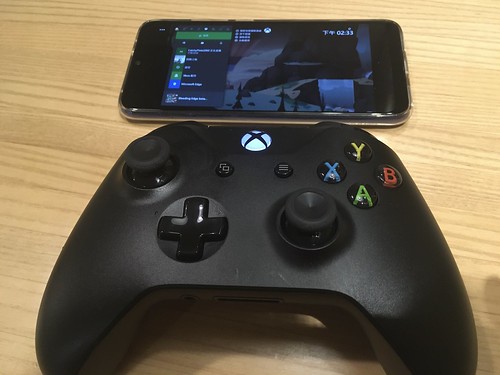
接著在 Google play 搜尋 xbox game streaming ,就能找到 Xbox Game Streaming (Preview) ,安裝完後,很快就能設定完成。主要把 Xbox 無線控制器跟手機藍芽配對後,就可以正常遠端 Xbox One S 了,嘗試把玩 NBA 2K20 或是快打旋風30周年慶,對於這種需要高更新畫面的遊戲,玩幾下就會看到極限了 XD 倒是老人回憶之旅那種篇益智遊戲,則非常的舒服。

Xbox xCloud Android Setup

Xbox xCloud Android Connect

如此就能體會主機串流的功能了!而大部分的體驗流程都是先到 google play 下載 xbox game streaming 後,接著得到你所在的區域並不支援 XD 殊不知要先從 Xbox One 更新預覽版才能開啟!

2020年3月13日 星期五

[macOS] GnuPG 筆記 - key generator / import / export / public key / private key

最近在跟大公司討論 DRM 事宜,要求信件採用 PGP 加密保護。筆記一下環境建置:

GnuPG 安裝:
  • 從 https://gnupg.org/download/ 到 GnuPG for OS X 區
  • 下載 GnuPG-2.2.19.dmg ,安裝後在 /usr/local/gnupg-2.2/
  • 推論環境變數可能就能找到 gpg2 ,或是用 /usr/local/gnupg-2.2/bin/gpg2
產生 GPG Keys(依照對方的使用設定):

$ gpg2 --full-generate-key
gpg (GnuPG) 2.2.19; Copyright (C) 2019 Free Software Foundation, Inc.
This is free software: you are free to change and redistribute it.
There is NO WARRANTY, to the extent permitted by law.

Please select what kind of key you want:
   (1) RSA and RSA (default)
   (2) DSA and Elgamal
   (3) DSA (sign only)
   (4) RSA (sign only)
  (14) Existing key from card
Your selection? 1
RSA keys may be between 1024 and 4096 bits long.
What keysize do you want? (2048)
Requested keysize is 2048 bits
Please specify how long the key should be valid.
         0 = key does not expire
      <n>  = key expires in n days
      <n>w = key expires in n weeks
      <n>m = key expires in n months
      <n>y = key expires in n years
Key is valid for? (0)
Key does not expire at all
Is this correct? (y/N) y

GnuPG needs to construct a user ID to identify your key.

Real name: HelloWorld
Email address: group@HelloWorld.com
Comment:
You selected this USER-ID:
    "HelloWorld <group@HelloWorld.com>"

Change (N)ame, (C)omment, (E)mail or (O)kay/(Q)uit? O
We need to generate a lot of random bytes. It is a good idea to perform
some other action (type on the keyboard, move the mouse, utilize the
disks) during the prime generation; this gives the random number
generator a better chance to gain enough entropy.


Passphrase: HelloWorld!!


We need to generate a lot of random bytes. It is a good idea to perform
some other action (type on the keyboard, move the mouse, utilize the
disks) during the prime generation; this gives the random number
generator a better chance to gain enough entropy.
gpg: key ####### marked as ultimately trusted
gpg: directory '/path/.gnupg/openpgp-revocs.d' created
gpg: revocation certificate stored as '/home/.gnupg/openpgp-revocs.d/#1#2#3#4#5#6#7#8#9#0.rev'
public and secret key created and signed.

pub   rsa2048 2020-03-13 [SC]
      #1#2#3#4#5#6#7#8#9#0
uid                      HelloWorld <group@HelloWorld.com>
sub   rsa2048 2020-03-13 [E]


匯出 Public Key 靠這招:

$ gpg2 --armor --export "HelloWorld <group@HelloWorld.com>" > your-pubkey.asc

$ gpg2 --armor --export "#1#2#3#4#5#6#7#8#9#0" > your-pubkey.asc


匯出 private key:

$ gpg2 --export-secret-keys "HelloWorld <group@HelloWorld.com>" > your-private-key.asc

$ gpg2 --export-secret-keys "#1#2#3#4#5#6#7#8#9#0" > your-private-key.asc


列出目前的 keys:

$ gpg2 --list-keys
/path/.gnupg/pubring.kbx
------------------------------------
pub   rsa2048 2020-03-13 [SC]
      #1#2#3#4#5#6#7#8#9#0
uid           [ unknown] HelloWorld <group@HelloWorld.com>
sub   rsa2048 2020-03-13 [E]

$ gpg2 --list-secret-keys
/path/.gnupg/pubring.kbx
------------------------------------
sec   rsa2048 2020-03-13 [SC]
      #1#2#3#4#5#6#7#8#9#0
uid           [unknown] HelloWorld <group@HelloWorld.com>
ssb   rsa2048 2020-03-13 [E]


刪除 Keys,若該 key 組合內有 secret key ,需要先刪除 secret key  :

$ gpg2 --delete-secret-keys "#1#2#3#4#5#6#7#8#9#0"

刪除 public key:

$ gpg2 --delete-keys "#1#2#3#4#5#6#7#8#9#0"

匯入 Keys:

$ gpg2 --import your-private-key.asc
$ gpg2 --import your-pubkey.asc


使用 Keys 做加密,產生 *.gpg 檔案:

$ cat /tmp/text
hello world
$ gpg2 -r "#1#2#3#4#5#6#7#8#9#0" -e /tmp/text
$ ls /tmp/text.gpg
/tmp/text.gpg


使用 Keys 對 *.gpg 解密,若沒有 private key 獲得到:

$ gpg2 -r "#1#2#3#4#5#6#7#8#9#0" -d /tmp/text.gpg
gpg: encrypted with 2048-bit RSA key, ID ######, created 2020-03-13
      "HelloWorld <group@HelloWorld.com>"
gpg: decryption failed: No secret key


有 private key 就會正常解出來:

$ gpg2 -r "#1#2#3#4#5#6#7#8#9#0" -d /tmp/text.gpg
gpg: encrypted with 2048-bit RSA key, ID #, created 2020-03-13
      "HelloWorld <group@HelloWorld.com>"
hello world