顯示具有 glacier 標籤的文章。 顯示所有文章

2015年5月16日 星期六

Bash 筆記 - 使用時間區間備份 MySQL 資料表

由於資料屬性的關係,剛好有幾個 table 都有 timestamp 這個資訊,拿來備份恰恰好,設計一下備份方式:
  • 一次備份 n 個月
  • 限制每 n 個月一次或是每次執行只備份前面符合條件的 n 個月
例如 n=6 時,在 1~6 月只能備份去年 7~12 月資料,在 7~12 月時,才能 1~6 月份的資料,並且讓程式能夠小小容錯,例如以產生過的資料就不要再匯出、匯出的資料要做壓縮、壓縮完要測試解壓縮、產生 md5 驗證等。

總之,技術細項:
  1. 使用 data 指令得知現況時間並計算出備份範圍
  2. 使用 mysqldump 搭配 --where 指令匯出指定 timestamp 資料
  3. 使用 tar -zcvf 備份資料為 tar.gz 格式
  4. 使用 gunzip -t 測試壓縮資料
  5. 使用 md5sum 建立壓縮檔案的驗證檔
執行方式,採用 bash, mysqldump, tar, gunzip, md5sum, date 指令:

#!/bin/bash
month_offset=0
month_range=6

current_month=`date +"%m"`
if [ ${current_month:0:1} -eq '0' ] ; then
        current_month=${current_month:1:1}
fi
month_offset=$(( $(($current_month + $month_range - 1)) % $month_range  ))
timestamp_begin_date=`date +"%Y-%m-01 00:00:00" -d "-$(($month_offset + $month_range)) month"`
timestamp_end_date=`date +"%Y-%m-01 00:00:00" -d "-$month_offset month"`
timestamp_init_date=`date +"%Y-%m-01"  -d "-$month_offset month"`
timestamp_out_date=`date +"%Y-%m-%d" -d "$timestamp_init_date -1 day" `
job_id=`date +"%Y-%m" -d "-$(($month_offset + 1)) month"`

DIR=/data/routine
log_dir=$DIR/log
dump_dir=$DIR/db
mkdir -p $log_dir $dump_dir
echo "[INFO] Job ID: $job_id , Begin: $timestamp_begin_date , End: $timestamp_end_date"
echo "[INFO] Working Dir: $DIR , log: $log_dir , export: $dump_dir"
echo "[INFO] Output suffix: $timestamp_out_date"
echo

arget_host=MyDBServerIP
target_user=UserID
target_pass=UserPassword
target_db=DatabaseName
target_table=("table1" "table2" "table3")
for table in "${target_table[@]}" ;do
if [ ! -f "$dump_dir/$table.$timestamp_out_date.sql" ] ; then
cmd="time mysqldump -h $target_host -u $target_user -p$target_pass --where \"timestamp >= '$timestamp_begin_date' AND timestamp < '$timestamp_end_date'\" --single-transaction --databases $target_db --tables $table > $dump_dir/$table.$timestamp_out_date.sql"
echo $cmd;
        fi        
done

echo
echo -n "Wanna go (y/N): "
read ans

if [ "$ans" == 'Y' ] || [ "$ans" == 'y' ] ; then
for table in "${target_table[@]}" ;do
output_file=$table.$timestamp_out_date.sql
output_archive_file=$output_file.tar.gz
output_archive_check_file=$output_archive_file.md5
echo
echo "build target: $output_file"
echo "\t$output_archive_file"
echo "\t$output_archive_check_file"
echo "..."
if [ ! -f "$dump_dir/$output_file" ] ; then
cmd="time mysqldump -h $target_host -u $target_user -p$target_pass --databases $target_db --tables $table --single-transaction --where \"timestamp >= '$timestamp_begin_date' AND timestamp < '$timestamp_end_date'\" > $dump_dir/$output_file"
echo $cmd
time mysqldump -h $target_host -u $target_user -p$target_pass --databases $target_db --tables $table --single-transaction --where "timestamp >= '$timestamp_begin_date' AND timestamp < '$timestamp_end_date'" > $dump_dir/$output_file
fi
if [ ! -f "$dump_dir/$output_archive_file" ] ; then
echo "time tar -zcf \"$table.$timestamp_out_date.sql.tar.gz\" \"$table.$timestamp_out_date.sql\""
cd $dump_dir && time tar -zcf "$output_archive_file" "$output_file"
fi
if [ -f "$dump_dir/$output_archive_file" ] && [ ! -f "$dump_dir/$output_archive_check_file" ] ; then
echo "time gunzip -t $output_archive_file && time md5sum $output_archive_file > $output_archive_check_file"
cd $dump_dir && time gunzip -t $output_archive_file && time md5sum $output_archive_file > $output_archive_check_file
fi
done
fi


若還有其他興趣的話,可以再結合 AWS glacier 的上傳,例如:

aws_glacier_bin="java -jar /path/uploader-0.0.8-SNAPSHOT-jar-with-dependencies.jar "
aws_glacier_region=https://glacier.region-id.amazonaws.com
aws_glacier_dir=db-log
aws_glacier_partsize=134217728

if [ "$aws_glacier" == 'Y' ] || [ "$aws_glacier" == 'y' ] ; then
for table in "${target_table[@]}" ;do
output_file=$table.$timestamp_out_date.sql
output_archive_file=$output_file.tar.gz
output_archive_check_file=$output_archive_file.md5
echo
echo "selected: $output_archive_file"
if [ -f "$dump_dir/$output_archive_file" ] && [ -f "$dump_dir/$output_archive_check_file" ] ; then
echo "do upload: $output_archive_file"
cmd="time $aws_glacier_bin --endpoint \"$aws_glacier_region\" -v \"$aws_glacier_dir\" --multipartupload \"$output_archive_file\" --partsize $aws_glacier_partsize  "
echo $cmd;
cd $dump_dir && eval $cmd;
fi
done
fi

2015年2月12日 星期四

AWS 筆記 - 使用 AWS Glacier 服務備份大量資料 @ Ubuntu 14.04

這個服務大概 2014 年夏天就開始關注並且在秋天嘗試使用,曾經也寫過一篇筆記但...最後沒發表 XD 實在是 AWS Glacier 如其名,大部份的指令真的像冰河緩慢移動 Orz 接著忙了就忘了。這次下定決心來寫一篇筆記。

簡言之,費用比 AWS S3 便宜,但是存取 AWS Glacier 的行為更像傳統磁帶模式,很多操作動作,會先給你一個 Job ID,還得手動用此 ID 去確認結果。例如想查閱已經有多少檔案,會發一個需求 Job ID 給你,而非馬上跟你說已經有多少檔案了。

整體上,要上傳資料一定要走 AWS API 方式,也就是到 AWS IAM 上建立一個 user,給予以下權限:
  • Amazon Glacier Full Access (另一個則是 Amazon Glacier Read Only Access)
  • Amazon SQS Full Access (下載檔案會用到, 若工作僅上傳則不需要, 沒有時的錯誤訊息: Access to the resource https://sqs.ap-northeast-1.amazonaws.com/ is denied)
  • Amazon SNS Full Access (下載檔案會用到, 若工作僅上傳則不需要, 沒有時的錯誤訊息: User: arn:aws:iam::####:user/#### is not authorized to perform: SNS:CreateTopic on resource)
我記得去年摸時,是使用 Amazon SimpleDB (sdb:*) 相關的權限,印象中跟 metadata 有關,不過現在卻沒查到了?! :P 接著,替使用者建立一組 access key/ secret key 來使用,而往後的上傳、下載等是靠這組 API KEY 工作。

此外,使用 AWS Glacier 前,要稍微瞭解一下操作方式
  • 不同的 Data Center 會因為電價等關係,所以儲存的費用不一樣。
  • 上傳資料前,除了要挑選 Data Center 外,還需要類似建立一個類似目錄的儲存單位 (Vault)
  • 除了網頁版 GUI 可以進行 Create Vault, Delete Vault 外,其餘都一律透過 API 進行,其中 Delete Vault 還必須確定裡頭沒其他檔案
  • 透過 API 操作時,需要的基本參數為 API KEY、Data Center (region/endpoint) 等資料
雖然用過 python 版工具 https://github.com/uskudnik/amazon-glacier-cmd-interface,這次就來用用 Java 版吧!https://github.com/MoriTanosuke/glacieruploader

建立 Vault (可透過 AWS Web Console)操作:

$ java -jar uploader-0.0.8-SNAPSHOT-jar-with-dependencies.jar -e "https://glacier.ap-northeast-1.amazonaws.com" -v changyy-vault -c
INFO  Using end point: https://glacier.ap-northeast-1.amazonaws.com
INFO  Creating vault changyy-vault...
INFO  Vault changyy-vault created. {Location: /##########/vaults/changyy-vault}
LastInventoryDate: null
NumberOfArchives: 0
SizeInBytes: 0
VaultARN: arn:aws:glacier:ap-northeast-1:##########:vaults/changyy-vault
VaultName: changyy-vault


上傳檔案(最後的 archive 接的資料就是該筆料的 ID):

$ java -jar uploader-0.0.8-SNAPSHOT-jar-with-dependencies.jar -e "https://glacier.ap-northeast-1.amazonaws.com" -v changyy-vault --upload ~/uploader-0.0.8-SNAPSHOT-jar-with-dependencies.jar
INFO  Using end point: https://glacier.ap-northeast-1.amazonaws.com
INFO  Starting to upload $HOME/uploader-0.0.8-SNAPSHOT-jar-with-dependencies.jar to vault changyy-vault...
INFO  Uploaded archive ########################################


切檔上傳,此例是 128MB 為單位,適合檔案很大的情境(Archive ID 接的資料就是該筆料的 ID):

$ java -jar uploader-0.0.8-SNAPSHOT-jar-with-dependencies.jar -e "https://glacier.ap-northeast-1.amazonaws.com" -v changyy-vault --upload ~/uploader-0.0.8-SNAPSHOT-jar-with-dependencies.jar --multipartupload ~/TargetBigFile --partsize 134217728
INFO  Using end point: https://glacier.ap-northeast-1.amazonaws.com/
INFO  Multipart uploading TargetBigFile to vault changyy-vault with part size 134217728 (128.00MB).
INFO  Upload ID (token): ################################################
INFO  Part 1/187 (bytes 0-134217727/*) uploaded, checksum: e19319be5e3c5d3f45a1ce7ef9ab3644b6933ec01c0754285babf45eb46b5b0b
...
INFO  Part 187/187 (bytes 24964497408-24993715534/*) uploaded, checksum: d0219f53b4f54431495211bfd8880fe52597354acc51aa077dcb67cacee69f53
INFO  Uploaded Archive ID: ################################################
INFO  Local Checksum: a1500723e11892cc2bb297d5d6f97a08035e30810ae0e3342184fbed4e2c2d5b
INFO  Remote Checksum: a1500723e11892cc2bb297d5d6f97a08035e30810ae0e3342184fbed4e2c2d5b
INFO  Checksums are identical, upload succeeded.


然而,剛上傳完是無法馬上下載的 :P 而想要查詢檔案列也是,必須先發一個"查詢列表"的工作(得到 Job ID),等工作結束後才能查詢到結果(取得檔案列表)

發出"查詢 Vault 檔案列表"的需求:

$ java -jar uploader-0.0.8-SNAPSHOT-jar-with-dependencies.jar -e "https://glacier.ap-northeast-1.amazonaws.com" -v changyy-vault -l
INFO  Using end point: https://glacier.ap-northeast-1.amazonaws.com
INFO  Starting inventory listing for vault changyy-vault...
INFO  Inventory Job created with ID
8KDBk2AS_9bYC8dIOBHxjitqxaLhEklXPfU6jZO-t-su3cp1k3NaHFIUpFaBiJDXDGFyzYyqaw-3MboGNlJ2W6kKDzmt


若這個 Vault 是剛建立的,還會有類似錯誤訊息:vaults/changyy-vault cannot be initiated yet, as Amazon Glacier has not yet generated an initial inventory for this vault.

取得"查詢 Vault 檔案列表"的結果:

$ java -jar uploader-0.0.8-SNAPSHOT-jar-with-dependencies.jar -e "https://glacier.ap-northeast-1.amazonaws.com" -v changyy-vault -l 8KDBk2AS_9bYC8dIOBHxjitqxaLhEklXPfU6jZO-t-su3cp1k3NaHFIUpFaBiJDXDGFyzYyqaw-3MboGNlJ2W6kKDzmt

若工作未做完,會顯示錯誤訊息:ERROR The job is not currently available for download。做完的話,會顯示清單,其中 Description 在這套 Java 工具下,會自動填寫上傳的檔名:

ARN: arn:aws:glacier:ap-northeast-1:##############:vaults/changyy-vault
------------------------------------------------------------------------------
Description:  uploader-0.0.8-SNAPSHOT-jar-with-dependencies.jar
Archive ID: q_SfW7MNmTE1_9xBbmzP5MvnEGYYmF8wCIe2aYs4_7NAXjn8fEO4nl97QZ-deJ_hDsKni7n5z0avn8gEdAnFfzMV4xE9FlF2Fr3UualyZj0b4LNSq9cENWYWoueSma9Kq8zGuwA9IA
CreationDate: 2015-02-07T11:17:36Z
Size: 19496656 (18.60MB)
SHA: d07cddbcbe3a83dba2b4ca654760bba4b77f92ae1ecc9f1fbffad337730fece0


下載檔案:

$ java -jar uploader-0.0.8-SNAPSHOT-jar-with-dependencies.jar -e "https://glacier.ap-northeast-1.amazonaws.com" -v changyy-vault --download q_SfW7MNmTE1_9xBbmzP5MvnEGYYmF8wCIe2aYs4_7NAXjn8fEO4nl97QZ-deJ_hDsKni7n5z0avn8gEdAnFfzMV4xE9FlF2Fr3UualyZj0b4LNSq9cENWYWoueSma9Kq8zGuwA9IA --target /tmp/test.jar
INFO  Using end point: https://glacier.ap-northeast-1.amazonaws.com
INFO  Downloading archive q_SfW7MNmTE1_9xBbmzP5MvnEGYYmF8wCIe2aYs4_7NAXjn8fEO4nl97QZ-deJ_hDsKni7n5z0avn8gEdAnFfzMV4xE9FlF2Fr3UualyZj0b4LNSq9cENWYWoueSma9Kq8zGuwA9IA from vault changyy-vault...
INFO Archive downloaded to /tmp/test.jar


整個過程不會馬上進入下載 Orz 例如我下載一個 52MB 的檔案,整個過程耗費 245 分鐘...絕對不是下載速度太慢,而是準備流程要等好一陣子。

刪除檔案:

$ java -jar uploader-0.0.8-SNAPSHOT-jar-with-dependencies.jar -e "https://glacier.ap-northeast-1.amazonaws.com" -v changyy-vault --delete q_SfW7MNmTE1_9xBbmzP5MvnEGYYmF8wCIe2aYs4_7NAXjn8fEO4nl97QZ-deJ_hDsKni7n5z0avn8gEdAnFfzMV4xE9FlF2Fr3UualyZj0b4LNSq9cENWYWoueSma9Kq8zGuwA9IA
INFO  Using end point: https://glacier.ap-northeast-1.amazonaws.com
INFO  Deleting archive q_SfW7MNmTE1_9xBbmzP5MvnEGYYmF8wCIe2aYs4_7NAXjn8fEO4nl97QZ-deJ_hDsKni7n5z0avn8gEdAnFfzMV4xE9FlF2Fr3UualyZj0b4LNSq9cENWYWoueSma9Kq8zGuwA9IA from vault changyy-vault...
INFO  Archive q_SfW7MNmTE1_9xBbmzP5MvnEGYYmF8wCIe2aYs4_7NAXjn8fEO4nl97QZ-deJ_hDsKni7n5z0avn8gEdAnFfzMV4xE9FlF2Fr3UualyZj0b4LNSq9cENWYWoueSma9Kq8zGuwA9IA deletion started from vault changyy-vault.


刪除 Vault:

$ java -jar uploader-0.0.8-SNAPSHOT-jar-with-dependencies.jar -e "https://glacier.ap-northeast-1.amazonaws.com" -v changyy-vault --delete-vault
INFO  Using end point: https://glacier.ap-northeast-1.amazonaws.com
INFO  Deleting vault changyy-vault...


若 vault 內還有檔案會有錯誤訊息:Vault not empty or recently written to: arn:aws:glacier:ap-northeast-1:############:vaults/changyy-vault。此外,若先去刪檔案,再來執行也會有一樣的問題,因為這是冰川啊 XD 刪檔也是慢慢地

整體心得,AWS Glacier 操作上真的很煩,因為太慢了。此外,也必須把那些 File Archive ID 記好,或是任何工作的 Job ID 記好,後續才能工作。有興趣可以在玩看看視窗介面,例如 CrossFTP 等,在操作檔案列表時,會跟你說要數小時(>5小時)才會得知結果,唯一的好處就是 CrossFTP 會幫你把一些 Job ID 記住吧

2014年7月1日 星期二

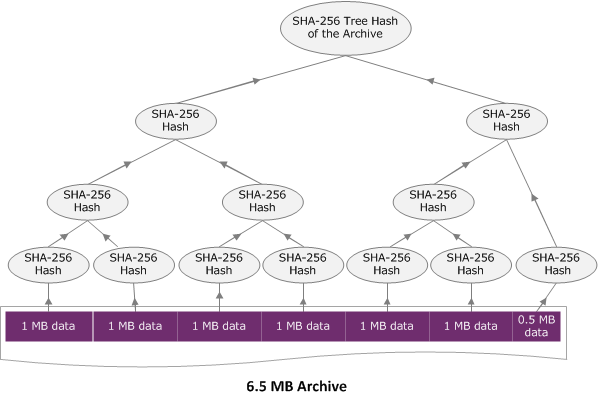
[Python] SHA256 Tree Hash @ Ubuntu 14.04

來源:AWS Computing Checksums

最近在用 AWS Glacier 備份資料時,發現 AWS 回傳的 SHA Checksum 的數值跟系統內建的 sha25sum 不一致,而 AWS Computing Checksums 有提供 Java 跟 C# 版本,因為邏輯很簡單,就順手刻一個 Python 版本:changyy/aws-glacier-sha256-tree-hash