2013年1月14日 星期一

[C] 一行指令建立帳號、更新密碼 (需setuid) @ Ubuntu 12.04

最近有需求要幫系統加入新增帳號、修改帳密的流程,所以想著想著,就蹦出了一支 C 程式,透過 setuid 的方式,終於可以完成這項工作 (經高手指點,bash 無法被 setuid 使用,也就是設定完後無法達成想要的結果,可以在 script 裡打 id 指令)


相關 Unix 指令回顧:


  • 一行指令新增帳號


    • $ sudo adduser --quiet --gecos "" --disabled-login --no-create-home --shell "/usr/sbin/nologin" tester


  • 一行指令更新密碼


    • $ echo "tester:password" | chpasswd


  • 檢查使用者是否存在


    • $ getent passwd tester


程式碼:


#include <stdio.h>
#include <stdlib.h>
#include <string.h>


#include <sys/types.h>
#include <unistd.h>


#define CMD_ADDUSER "sudo adduser --quiet --gecos \"\" --disabled-login --no-create-home --shell \"/usr/sbin/nologin\" "
#define CMD_CHECK_USER_EXISTS "getent passwd"
#define MAX_BUFFER_LINE 1024
int main(int argc, char *argv[])
{
   char buf[MAX_BUFFER_LINE+1], pass[MAX_BUFFER_LINE+1], *cmd;
   FILE *fp;
   setuid(0); // use root
   //system("id");
   if( argc < 3 )
   {
      fprintf( stderr, "Usage> %s username [ - | password]\n\t%s username -\t\t(read password from stdin)\n\t%s username password\n\n\tothers: sudo chown root %s && sudo chmod 4755 %s\n" , argv[0], argv[0], argv[0] , argv[0], argv[0] );
      exit(1);
   }


   memset( buf, 0, MAX_BUFFER_LINE + 1);
   memset( pass, 0, MAX_BUFFER_LINE + 1);
   if( argv[2][0] != '-' )
   {
      strncpy( pass, argv[2], MAX_BUFFER_LINE );
      pass[MAX_BUFFER_LINE] = '\0';
   }
   else if( !feof( stdin ) && fgets( pass, MAX_BUFFER_LINE, stdin ) > 0 )
   {
      //printf("Pass:[%s]\n",pass);
   }


   if( strlen(pass) < 1 )
   {
      fprintf( stderr, "Error @ Init: password is empty\n" );
      exit(1);
   }

   // check account exists
   cmd = buf;
   snprintf( buf, MAX_BUFFER_LINE, "%s %s", CMD_CHECK_USER_EXISTS, argv[1] );
   fp = popen( cmd , "r" );


   memset( buf, 0, MAX_BUFFER_LINE + 1);
   fgets( buf, MAX_BUFFER_LINE, fp );
   pclose(fp);


   if( !strlen(buf) ) // create the account if not exists
   {
      // add account
      memset( buf, 0, MAX_BUFFER_LINE + 1);
      cmd = buf;
      snprintf( buf, MAX_BUFFER_LINE, "%s %s", CMD_ADDUSER, argv[1] );
      pclose( popen( cmd , "r" ) );


      // query the account
      memset( buf, 0, MAX_BUFFER_LINE + 1);
      cmd = buf;
      snprintf( buf, MAX_BUFFER_LINE, "%s %s", CMD_CHECK_USER_EXISTS, argv[1] );
      fp = popen( cmd , "r" );
      memset( buf, 0, MAX_BUFFER_LINE + 1);
      fgets( buf, MAX_BUFFER_LINE, fp );
      pclose(fp);

      if( !strstr( buf, argv[1] ) ) // user is not created
      {
         printf("Error @ create an account: user cannot be created\n");
         exit(1);
      }


      // change password
      memset( buf, 0, MAX_BUFFER_LINE + 1);
      cmd = buf;
      snprintf( buf, MAX_BUFFER_LINE, "echo \"%s:%s\" | chpasswd ", argv[1] , pass );
      fp = popen( cmd , "r" );
      memset( buf, 0, MAX_BUFFER_LINE + 1);
      fgets( buf, MAX_BUFFER_LINE, fp );
      pclose(fp);
      if( !strlen(buf) )
         printf("OK\n");
   }
   else if( strstr( buf, "/bin/false" ) || strstr( buf, "/nologin" ) ) // change password
   {
      // change password
      memset( buf, 0, MAX_BUFFER_LINE + 1);
      cmd = buf;
      snprintf( buf, MAX_BUFFER_LINE, "echo \"%s:%s\" | chpasswd ", argv[1] , pass );
      fp = popen( cmd , "r" );
      memset( buf, 0, MAX_BUFFER_LINE + 1);
      fgets( buf, MAX_BUFFER_LINE, fp );
      pclose(fp);
      if( !strlen(buf) )
         printf("OK\n");
   }
   else
   {
      printf("SKIP @ cannot change the password for '%s'.\n", argv[1]);
   }
   return 0;
}


暫時把這隻程式定位:


  • 可以新增 nologin 帳號

  • 可以修改 nologin 帳號的密碼


用法:


$ gcc main.c
$ sudo chown root ./a.out && sudo chmod 4755 ./a.out
$ ./a.out new_account new_password


若要在安全一下,可以在設定 uid 範圍,以避免改到一些系統帳號。


2013年1月11日 星期五

[PHP] 處理 PHP 5.3 php-cgi (FastCGI) 掛掉的現象 @ ARM Linux

ab_-n_3000_-c_20


最近的小任務是要在 ARM Linux 版上配置 PHP 環境,所幸同事都先編好,讓我無痛移植 XD 只是在設定過程中,雖然沒發現 php-fpm 存在(忘了編?),但至少還有隻 php-cgi 可以把玩。


既然在板子上,勢必要測試一下堪用度,所以就用 index.php ,內文用 "<?php  phpinfo(); " ,接著找另一台 Linux 跑 ab test:


terminal 1:
$ php/bin/php-cgi -b 127.0.0.1:9000


terminal 2:
$ ab -n 300 -c 20 http://10.0.0.168/index.php


這段 ab 跑下去,嗯,感覺良好,接著我再跑一次 ab 後,在 terminal 1 得 php-cgi 就跳出了(crash?),並且看到 ab report 有 Failed requests (此例是 -n 600):


Concurrency Level: 20
Time taken for tests: 1.235 seconds
Complete requests: 600
Failed requests: 100
(Connect: 0, Receive: 0, Length: 100, Exceptions: 0)
Write errors: 0
Non-2xx responses: 600
Total transferred: 160500 bytes
HTML transferred: 66200 bytes
Requests per second: 485.68 [#/sec] (mean)
Time per request: 41.180 [ms] (mean)
Time per request: 2.059 [ms] (mean, across all concurrent requests)
Transfer rate: 126.87 [Kbytes/sec] received


接著再網路打滾一陣子,看到的解法很多是 crontab 定期開後,有點失落 XD 最後當我準備編 php-fpm 前,看到對岸好文 启动 PHP 内置 FastCGI Server 的脚本 後,搞懂原理後,就迎刃而解啦!


最後使用的參數:


terminal 1:
$ export PHP_FCGI_MAX_REQUESTS=300;
$ export PHP_FCGI_CHILDREN=4;
$ /path/php/bin/php-cgi -b 127.0.0.1:9000


terminal 2:
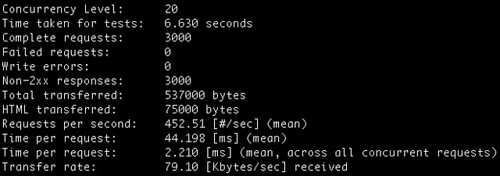
$ ab -n 3000 -c 20 http://10.0.0.168/index.php
...
Document Path: /index.php
Document Length: 25 bytes


Concurrency Level: 20
Time taken for tests: 6.630 seconds
Complete requests: 3000
Failed requests: 0
Write errors: 0
Non-2xx responses: 3000
Total transferred: 537000 bytes
HTML transferred: 75000 bytes
Requests per second: 452.51 [#/sec] (mean)
Time per request: 44.198 [ms] (mean)
Time per request: 2.210 [ms] (mean, across all concurrent requests)
Transfer rate: 79.10 [Kbytes/sec] received


Connection Times (ms)
min mean[+/-sd] median max
Connect: 0 1 0.3 0 4
Processing: 18 43 4.5 43 93
Waiting: 18 43 4.5 43 92
Total: 22 44 4.5 44 93
ERROR: The median and mean for the initial connection time are more than twice the standard
deviation apart. These results are NOT reliable.


Percentage of the requests served within a certain time (ms)
50% 44
66% 44
75% 45
80% 45
90% 46
95% 46
98% 59
99% 68
100% 93 (longest request)


嘖嘖,堪用堪用啊。而原先 500 個 requests 就會掛得原因是預設 PHP_FCGI_MAX_REQUESTS=500 啦,總之,如此一來,就可以繼續用 PHP 把玩了。而要重現處理完 PHP_FCGI_MAX_REQUESTS 就關掉的話,就只需設定 PHP_FCGI_CHILDREN=0 即可


2013年1月4日 星期五

[Linux] 把玩 PAM 筆記 (Dovecot、Postfix 與 POP3/IMAP 認證為例) @ Ubuntu 12.04

PAM 全名為 Pluggable Authentication Module,可用在跨系統的帳號認證整合。有幸從同事那邊得到這邊的資訊,所以來筆記一下。更多 PAM 資訊可自行 Google 一下。在此筆記把玩的成果。


使用情境:


  • 一個提供帳號登入的 Web Service (A系統)

  • 一個提供 POP3/IMAP/SMTP 服務的 Mail Server (B系統)


如果想要提供 B 系統用 A 系統的帳號來做認證時,這時候就可以採用 PAM 來處理,例如在帳密登入流程中,加入 A系統認證流程。(註:此例以 Mail Server 舉例不甚理想,因為 PAM 無法解決 Mail Server 收信的問題,也就是無法提供 user list 讓 Mail Server 驗證帳號是否有效,在此僅用在登入帳密範例)


作法:


  • 實作 pam_yychecker.so 模組,用來認證 A 系統帳號

  • 使用 Dovecot POP3/IMAP 服務架構,增加 pam_yychecker.so 作為帳密認證


實作 pam_yychecker.so 模組:


pam_yychecker.c:(此例為任何帳密進來都 pass,而認證方面應修改 pam_sm_authenticate 函數,把取到的帳密到 A 系統認證)


// 參考 http://www.openpam.org/browser/openpam/trunk/modules/pam_unix/pam_unix.c


$ sudo apt-get install gcc libpam-dev make
$ gcc -shared -lpam -fPIC -Wall pam_yychecker.c -o pam_yychecker.so
$ sudo install pam_yychecker.so /lib/x86_64-linux-gnu/security


#include <stdlib.h>
#include <stdio.h>
#include <string.h>


#include <security/pam_modules.h>
#include <security/pam_ext.h>


#include <syslog.h>


#ifndef PAM_EXTERN
#define PAM_EXTERN
#endif


PAM_EXTERN int
pam_sm_authenticate(pam_handle_t *pamh, int flags,
int argc, const char *argv[])
{
    int i;
   const char *user;
   char *password;


   syslog(LOG_DEBUG, "@ yychecker [pam_sm_authenticate]");
   for (i=0 ; i < argc ; i++)
      syslog(LOG_DEBUG, "argv[%d]=[%s]",i, argv[i]);


   /* identify user */
   if (pam_get_user(pamh, &user, NULL) != PAM_SUCCESS)
      return PAM_AUTH_ERR;
   syslog(LOG_DEBUG, "@ yychecker [pam_sm_authenticate] get account:[%s]", user);


   /* get password */
   if (pam_get_authtok(pamh, PAM_AUTHTOK, (const char **)&password, NULL) != PAM_SUCCESS)
      return PAM_AUTH_ERR;
   syslog(LOG_DEBUG, "@ yychecker [pam_sm_authenticate] get password:[%s]", password);

   //
   //  add some checker
   // ...


   return PAM_SUCCESS;
}


PAM_EXTERN int
pam_sm_setcred(pam_handle_t *pamh, int flags,
int argc, const char *argv[])
{
   int i;
   syslog(LOG_DEBUG, "@ yychecker [pam_sm_setcred]");
   for (i=0 ; i < argc ; i++)
      syslog(LOG_DEBUG, "argv[%d]=[%s]",i, argv[i]);
   return (PAM_SUCCESS);
}


PAM_EXTERN int
pam_sm_acct_mgmt(pam_handle_t *pamh, int flags,
int argc, const char *argv[])
{
   int i;
   syslog(LOG_DEBUG, "@ yychecker [pam_sm_acct_mgmt]");
   for (i=0 ; i < argc ; i++)
      syslog(LOG_DEBUG, "argv[%d]=[%s]",i, argv[i]);
   return (PAM_SUCCESS);
}


PAM_EXTERN int
pam_sm_open_session(pam_handle_t *pamh, int flags,
int argc, const char *argv[])
{
   int i;
   syslog(LOG_DEBUG, "@ yychecker [pam_sm_open_session");
   for (i=0 ; i < argc ; i++)
      syslog(LOG_DEBUG, "argv[%d]=[%s]",i, argv[i]);
   return (PAM_SUCCESS);
}


PAM_EXTERN int
pam_sm_close_session(pam_handle_t *pamh, int flags,
int argc, const char *argv[])
{
   int i;
   syslog(LOG_DEBUG, "@ yychecker [pam_sm_close_session");
   for (i=0 ; i < argc ; i++)
      syslog(LOG_DEBUG, "argv[%d]=[%s]",i, argv[i]);
   return (PAM_SUCCESS);
}


PAM_EXTERN int
pam_sm_chauthtok(pam_handle_t *pamh, int flags,
int argc, const char *argv[])
{
   int i;
   syslog(LOG_DEBUG, "@ yychecker [pam_sm_chauthtok]");
   for (i=0 ; i < argc ; i++)
      syslog(LOG_DEBUG, "argv[%d]=[%s]",i, argv[i]);
   return (PAM_SERVICE_ERR);
}


使用 pam_yychecker.so 模組:


在此挑 Dovecot IMAP/POP3 為例:


@ /etc/pam.d/yychecker


auth required pam_checker.so debug  # "debug" 可讓 pam_yychecker.c 中的 syslog(LOG_DEBUG, "" ) 起作用,在 /var/log/syslog 可看見訊息
account required pam_checker.so debug arg1=val1  # arg1=val1 純粹測試用,可在 pam_yychecker.c 看到參數傳進來


@ /etc/dovecot/conf.d/99-yychecker.conf


auth_mechanisms = plain login
protocols = pop3 imap
mail_location = maildir:/home/vmail/%u/Maildir
auth_debug=yes # 更多豐富的訊息
passdb {
    driver = pam
    args = yychecker   # /etc/pam.d/yychecker 
}
userdb {
    driver = static
    args = uid=vmail gid=vmail home=/home/vmail/%u
}


透過撰寫上述兩個檔案後,將 dovecot 重開後 (/etc/init.d/dovecot restart),可以用 telnet/openssl 訪問 pop3/imap 服務:


IMAP:


$ openssl s_client -connect localhost:993
...
* OK [CAPABILITY IMAP4rev1 LITERAL+ SASL-IR LOGIN-REFERRALS ID ENABLE IDLE AUTH=PLAIN AUTH=LOGIN] Dovecot ready.
- login account password
- OK [CAPABILITY IMAP4rev1 LITERAL+ SASL-IR LOGIN-REFERRALS ID ENABLE IDLE SORT SORT=DISPLAY THREAD=REFERENCES THREAD=REFS MULTIAPPEND UNSELECT CHILDREN NAMESPACE UIDPLUS LIST-EXTENDED I18NLEVEL=1 CONDSTORE QRESYNC ESEARCH ESORT SEARCHRES WITHIN CONTEXT=SEARCH LIST-STATUS] Logged in
- logout
* BYE Logging out
- OK Logout completed.
closed


POP3:


$ openssl s_client -connect localhost:995
...
+OK Dovecot ready.
user account
+OK
pass password
+OK Logged in.
quit
+OK Logging out.
closed


上述例子藍色是輸入的指令,其中 - login 後面依序接帳號跟密碼,由於在 pam_yychecker.c 之 pam_sm_authenticate 函數中,都是回傳 PAM_SUCCESS ,因此無論哪組(不存在的)帳密都會因此 PASS 的


此外還可以翻一下 /var/log/syslog 得知一下訊息:(此次帳號為test, 密碼為test)


dovecot: auth: Debug: Loading modules from directory: /usr/lib/dovecot/modules/auth
ovecot: auth: Debug: auth client connected (pid=14779)
dovecot: auth: Debug: client in: AUTH#0111#011PLAIN#011service=pop3#011secured#011lip=127.0.0.1#011rip=127.0.0.1#011lport=995#011rport=44325#011resp=AHRlc3QAdGVzdA==
dovecot: auth-worker: Debug: Loading modules from directory: /usr/lib/dovecot/modules/auth
dovecot: auth-worker: Debug: pam(test,127.0.0.1): lookup service=dovecot
dovecot: auth-worker: Debug: pam(test,127.0.0.1): #1/1 style=1 msg=Password:
dovecot: auth-worker: pam(test,127.0.0.1): pam_authenticate() failed: Authentication failure (password mismatch?) (given password: test)
dovecot: auth-worker: Debug: pam(test,127.0.0.1): lookup service=yychecker
auth: @ yychecker [pam_sm_authenticate]
auth: argv[0]=[debug]
auth: @ yychecker [pam_sm_authenticate] get account:[test]
dovecot: auth-worker: Debug: pam(test,127.0.0.1): #1/1 style=1 msg=Password:
auth: @ yychecker [pam_sm_authenticate] get password:[test]
auth: @ yychecker [pam_sm_acct_mgmt]
auth: argv[0]=[debug]
auth: argv[1]=[arg1=val1]
dovecot: auth: Debug: client out: OK#0111#011user=test
dovecot: auth: Debug: master in: REQUEST#0112190999553#01114779#0111#011a7a91b0fc5002a5eb77113ceb9304c7c
dovecot: auth: Debug: passwd(test,127.0.0.1): lookup
dovecot: auth: passwd(test,127.0.0.1): unknown user
dovecot: auth: Debug: master out: USER#0112190999553#011test#011uid=1002#011gid=1003#011home=/home/vmail/test
dovecot: pop3-login: Login: user=<test>, method=PLAIN, rip=127.0.0.1, lip=127.0.0.1, mpid=14783, TLS
dovecot: pop3(test): Disconnected: Logged out top=0/0, retr=0/0, del=0/0, size=0


從 syslog 大概可以看到,認證流程一開始是內建的帳密系統(/etc/pam.d/dovecot敘述),後來接著走 (/etc/pam.d/yychecker),接著依序走過 pam_sm_authenticate 和 pam_sm_acct_mgmt 函數。如果未實作 pam_sm_acct_mgmt 或 pam_sm_acct_mgmt 回傳 PAM_AUTH_ERR 時,也看到認證失敗的訊息。因此,對於 dovecot PAM 的使用中,除了一開始在 pam_sm_authenticate 就處理帳號過濾外,也可在 pam_sm_acct_mgmt 進行帳號的過濾。


原先是打算利用 PAM 來提供 Mail server (B系統) 使用 Web service (A系統) 帳號進行收信、送信,但測試的結果,盡管可以讓 POP3/IMAP/SMTP 認證都搞定(SMTP還須額外設定,上述範例設定檔還不夠),但在 Mail Server 之 deliver 上,採用 Dovecot LDA 卻碰到 userdb static 問題,也就是無法提供帳號認證,導致 Mail server 無把將 A 系統帳號視為有效帳號。也有可能是 PAM 寫錯或調教經驗上淺,玩了兩天還沒有好的成果。目前的結論是...還是乖乖用 dovecot userdb 其他要製造 user list 清單的方式吧 :P 在此就先筆記這幾天亂玩的東西。


2012年12月31日 星期一

iOS 開發筆記 - 國曆轉農曆計算 (Chinese Lunar Calendar)

lunar-2013-06


把玩一下 NSCalendar ,發現他可以計算咱們華人常用的農曆日期耶!完整文件 iOS Developer Library - Date and Time Programming Guide


程式碼:


NSString *dateAt = @"2013/06/08";
NSDateFormatter *dateFormatter = [[[NSDateFormatter allocinit] autorelease];
[dateFormatter setDateFormat:@"yyyy/MM/dd"];
NSDateComponents *dateComps = [[[[NSCalendar alloc] initWithCalendarIdentifier:NSChineseCalendar] autorelease] components:(NSYearCalendarUnit | NSMonthCalendarUnit | NSDayCalendarUnit) fromDate:[dateFormatter dateFromString:dateAt]];
NSLog(@"%@ => Chinese calendar date (Lunar): %0.2d/%0.2d", dateAt, [dateComps month], [dateComps day]);


結果: 


2013/06/08 => Chinese calendar date (Lunar): 05/01


註:有的農民曆將 2013/06/08 定為農曆 04/30,故挑這天當做範例提醒算法的不同。


2012年12月30日 星期日

2012年的最後一天

Life & Sea


今年很特別,發生了不少事,體驗過交接離職同事待結案的案子(還一次三案 orz)、同公司換單位、跟同好分道揚鑣、Android、國外自助旅行、找房子、搬家、役畢、換公司、iOS、國內離島旅行、看顧、狂用悠遊卡等,想起來真的經歷不少事,記得役畢前還斤斤計較如何追求工作薪資的 CP 值,很奇妙地一役畢反而不在意,看著周邊親友工作上的來來往往,有的厭膩生態、有的追求夢想都好,都是踏出人生的下一步。難得 12/31 可以在老家休息,回老鄉走走,從火車站步行回家,看看許久未見的街景,可真是熟悉又陌生。


回顧這一年,收獲不少,但開始會想想是不是該多充實生活化的記事,例如遊記、聚餐、拍照、音樂、遊戲、語文呢?說真的我還滿高興自己亂寫的一些旅遊或遊戲筆記的瀏覽次數高於一些技術筆記,新年一年應該可以多想想,學一些語文、文化勝於新的程式語言,多走一些景點勝於多開幾個專案。


只是,年都還沒跨過去,又馬上收到新的一年的工作計畫,看來明年一開始又得忙了,越來越多的新事物、挑戰跟角色,年輕就該多衝刺嘛,這大概就是所謂的人生吧!


總之,新年快樂!