2013年8月24日 星期六

[Linux] 讓 Gitweb 支援 Markdown 顯示 @ Ubuntu 12.04

Gitweb & Markdown

之前同事很常用 Markdown 寫筆記,希望公司用的 gitweb 可以支援,所以我就稍微下海改一下 Perl 啦 XD 在改之前也有上網查了一下,其實 gitweb 本身已經有一個架構可以展現 repo/READM.html 的功能,其實搭配 git 可以弄成每次 project commit 後,自動將某個 markdown 檔案產生對應的 HTML 來用。

可在 /usr/share/gitweb/index.cgi 搜尋 READM.html 找到這片段程式碼:

# If XSS prevention is on, we don't include README.html.
# TODO: Allow a readme in some safe format.
if (!$prevent_xss && -s "$projectroot/$project/README.html") {
        print "<div class=\"title\">readme</div>\n" .
              "<div class=\"readme\">\n";
        insert_file("$projectroot/$project/README.html");
        print "\n</div>\n"; # class="readme"
}


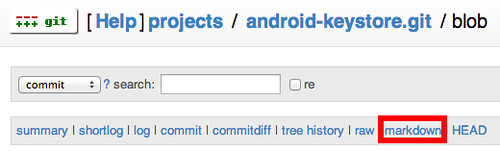
但如此一來就侷限一個 project 只能展現的單一 markdown 檔案,思考一會後,我就選擇依照 gitweb 架構,在處理檔案時的 raw 項目,依樣畫葫做出一個 markdown 選項 XD

做法:
  1. 安裝 markdown ,讓系統支援 markdown 指定
  2. 找尋 sub git_blob_plain 程式碼,複製一份成 sub git_blob_markdown
  3. 找尋 raw 關鍵字,可以在 sub git_blob 中看到選單,只需在 raw 和 HEAD 中間插入 markdown 選單,並註冊 our %actions 處理此動作
  4. 修改 git_blob_markdown ,把它搞成讓 markdown 指令過水一下即可
片段程式碼:

our %actions = (
        ...
        "blob_plain" => \&git_blob_plain,
        "blob_markdown" => \&git_blob_markdown,
        ...
);


git_blob 片段程式碼:

$formats_nav .=
       $cgi->a({-href => href(action=>"history", -replay=>1)},
              "history") .
      " | " .
       $cgi->a({-href => href(action=>"blob_plain", -replay=>1)},
              "raw") .
      " | " .
      $cgi->a({-href => href(action=>"blob_markdown", -replay=>1)},
               "markdown") .
      " | " .

      $cgi->a({-href => href(action=>"blob",
                            hash_base=>"HEAD", file_name=>$file_name)},
              "HEAD");


git_blob_markdown:

sub git_blob_markdown {
        my $type = shift;
        my $expires;
        if (!defined $hash) {
                if (defined $file_name) {
                        my $base = $hash_base || git_get_head_hash($project);
                        $hash = git_get_hash_by_path($base, $file_name, "blob")
                                or die_error(404, "Cannot find file");
                } else {
                        die_error(400, "No file name defined");
                }
        } elsif ($hash =~ m/^[0-9a-fA-F]{40}$/) {
                # blobs defined by non-textual hash id's can be cached
                $expires = "+1d";
        }

        open my $fd, "git ".git_cmd()." cat-file blob $hash | markdown | "
        #open my $fd, "-|", git_cmd(), "cat-file", "blob", $hash
                or die_error(500, "Open git-cat-file blob '$hash' failed");

        $type = "text/html";

        # "save as" filename, even when no $file_name is given
        my $save_as = "$hash";
        if (defined $file_name) {
                $save_as = $file_name;
        } elsif ($type =~ m/^text\//) {
                $save_as .= '.txt';
        }

        my $sandbox = $prevent_xss &&
                $type !~ m!^(?:text/[a-z]+|image/(?:gif|png|jpeg))(?:[ ;]|$)!;


        print $cgi->header(
                -charset => 'UTF-8',
                -type => $type,
                -expires => $expires
                );
        local $/ = undef;
        binmode STDOUT, ':raw';
        print <$fd>;
        binmode STDOUT, ':utf8'; # as set at the beginning of gitweb.cgi
        close $fd;
}


比較特別的是...我還沒有真的搞懂 gitweb 或 perl 架構,像在 git_blob_markdown 裡頭,原本的架構是用 open my $fd, "-|", ... 繼續的,但我試了很久總搭不起來,就先偷懶用 "git" 代替了 :P 此外,若要增加 markdown 輸出的顯示,如 CSS 等,可以在 git_blob_markdown 下方的 printf <$fd>; 前面,去印一些 CSS 結構囉

2013年8月21日 星期三

[Linux] 增加 stack size 解決 g++ 編譯問題: Out of memory / virtual memory exhausted: Cannot allocate memory @ Ubuntu 12.04

最近在編譯同事的 C++ 程式時常常 crash 掉,噴訊息:
g++: internal compiler error: Killed (program cc1plus)
Please submit a full bug report,
with preprocessed source if appropriate.
See <file:///usr/share/doc/gcc-4.6/README.Bugs> for instructions.
追了一會兒後,才發現自己編譯 boost 1.54.0 也碰過這種事,查看 dmesg 有類似的訊息:
Out of memory: Kill process 5309 (cc1plus) score 327 or sacrifice child
Killed process 5309 (cc1plus) total-vm:720204kB, anon-rss:18672kB, file-rss:8kB
例如編譯 boost 1.54.0:
~/boost_1_54_0$ "g++"  -ftemplate-depth-128 -O3 -finline-functions -Wno-inline -Wall -pthread -fPIC -fno-strict-aliasing -ftemplate-depth-1024 -DBOOST_ALL_NO_LIB=1 -DBOOST_CHRONO_DYN_LINK=1 -DBOOST_DATE_TIME_DYN_LINK=1 -DBOOST_FILESYSTEM_DYN_LINK=1 -DBOOST_LOG_DYN_LINK=1 -DBOOST_LOG_SETUP_BUILDING_THE_LIB=1 -DBOOST_LOG_SETUP_DLL -DBOOST_LOG_USE_NATIVE_SYSLOG -DBOOST_LOG_USE_SSSE3 -DBOOST_LOG_WITHOUT_EVENT_LOG -DBOOST_SPIRIT_USE_PHOENIX_V3=1 -DBOOST_SYSTEM_DYN_LINK=1 -DBOOST_SYSTEM_NO_DEPRECATED -DBOOST_THREAD_BUILD_DLL=1 -DBOOST_THREAD_DONT_USE_CHRONO=1 -DBOOST_THREAD_POSIX -DBOOST_THREAD_USE_DLL=1 -DDATE_TIME_INLINE -DNDEBUG  -I"." -c -o "bin.v2/libs/log/build/gcc-4.6/release/build-no/log-api-unix/threading-multi/settings_parser.o" "libs/log/src/settings_parser.cpp"
噴訊息:
virtual memory exhausted: Cannot allocate memory
增加 stack-size 後 (-Wl,--stack=0x2000000),即可解決:

~/boost_1_54_0$ "g++" -Wl,--stack=0x2000000 -ftemplate-depth-128 -O3 -finline-functions -Wno-inline -Wall -pthread -fPIC -fno-strict-aliasing -ftemplate-depth-1024 -DBOOST_ALL_NO_LIB=1 -DBOOST_CHRONO_DYN_LINK=1 -DBOOST_DATE_TIME_DYN_LINK=1 -DBOOST_FILESYSTEM_DYN_LINK=1 -DBOOST_LOG_DYN_LINK=1 -DBOOST_LOG_SETUP_BUILDING_THE_LIB=1 -DBOOST_LOG_SETUP_DLL -DBOOST_LOG_USE_NATIVE_SYSLOG -DBOOST_LOG_USE_SSSE3 -DBOOST_LOG_WITHOUT_EVENT_LOG -DBOOST_SPIRIT_USE_PHOENIX_V3=1 -DBOOST_SYSTEM_DYN_LINK=1 -DBOOST_SYSTEM_NO_DEPRECATED -DBOOST_THREAD_BUILD_DLL=1 -DBOOST_THREAD_DONT_USE_CHRONO=1 -DBOOST_THREAD_POSIX -DBOOST_THREAD_USE_DLL=1 -DDATE_TIME_INLINE -DNDEBUG  -I"." -c -o "bin.v2/libs/log/build/gcc-4.6/release/build-no/log-api-unix/threading-multi/settings_parser.o" "libs/log/src/settings_parser.cpp"

對於編譯 boost 時,或許可以這樣用(更正確的用法應該是 LD_FLAGS):

~/boost_1_54_0$ ./bootstrap.sh
~/boost_1_54_0$ CXX="g++ -Wl,--stack=0x2000000" ./b2 -j2

2013年8月16日 星期五

[OSX] 使用 MacPorts 安裝 Boost 1.54.0 和 wxWidgets 2.9.5 (c++11, std=c++11, stdlib=libc++) @ Mac 10.8

最近用有案子 Boost 1.54.0 和 wxWidgets 2.9.5 來開發 OSX app,而採用 MacPorts 預設安裝 boost 跟 wxwidgets30 都只是預編好的,就算用 port -s 參數編出來的仍不支援 C++11。

然而編譯 boost 1.54.0 支援 c++11 也可以考慮用 brew 來安裝,只要加參數即可:

$ ruby -e "$(curl -fsSL https://raw.github.com/mxcl/homebrew/go)"
$ brew info boost
boost: stable 1.54.0 (bottled), HEAD
http://www.boost.org
Not installed
From: https://github.com/mxcl/homebrew/commits/master/Library/Formula/boost.rb
==> Options
--universal
        Build a universal binary
--with-c++11
        Compile using Clang, std=c++11 and stdlib=libc++
--with-icu
        Build regexp engine with icu support
--with-mpi
        Build with mpi support
--without-python
        Build without python support
--without-single
        Disable building single-threading variant
--without-static
        Disable building static library variant
$ brew install boost --with-c++11


但 brew 裡的 wxwidgets 只有到 2.9.4 版:

$ brew info wxwidgets
wxmac: stable 2.9.4.0
http://www.wxwidgets.org
Not installed
From: https://github.com/mxcl/homebrew/commits/master/Library/Formula/wxmac.rb
==> Options
--without-python
        Build without python support


摸索了一下 MacPorts 後,可以透過參數編譯使之支援 C++11:

$ port info boost wxwidgets30
boost @1.54.0 (devel)
Variants:             debug, [+]no_single, [+]no_static, openmpi, python25, python26, [+]python27, python31, python32, python33,
                      regex_match_extra, universal

Description:          Boost provides free portable peer-reviewed C++ libraries. The emphasis is on portable libraries which work
                      well with the C++ Standard Library.
Homepage:             http://www.boost.org

Library Dependencies: zlib, expat, bzip2, libiconv, icu, python27
Platforms:            darwin
License:              Boost-1
Maintainers:          nomaintainer@macports.org
--
wxWidgets30 @2.9.5_2 (graphics, devel)
Variants:             aui, debug, monolithic, [+]sdl, stdlib, universal

Description:          wxWidgets is a mature open-source cross-platform C++ GUI framework for Mac OS, Unix, Linux, Windows. It can
                      make use of a variety of native widget sets as well as its own widget set: Mac OS, GTK+, Motif, WIN32.
                      wxWidgets will even run on embedded systems using Linux and X11.
Homepage:             http://www.wxwidgets.org/

Library Dependencies: jpeg, tiff, libpng, zlib, libiconv, expat, libsdl, libsdl_mixer
Conflicts with:       wxgtk, wxWidgets
Platforms:            darwin
License:              wxwidgets-3.1
Maintainers:          jwa@macports.org, mojca@macports.org

$ sudo port install wxwidgets30
$ sudo port uninstall wxwidgets30
$ sudo port install -s wxWidgets30 configure.cc=clang configure.cxx="clang++ -std=c++11 -stdlib=libc++" configure.cxxflags="-std=c++11 -stdlib=libc++ -O2" configure.objcxxflags="-std=c++11 -stdlib=libc++ -O2"

$ sudo port install boost
$ sudo port uninstall boost
$ sudo port install -s boost configure.cc=clang configure.cxx="clang++ -std=c++11 -stdlib=libc++" configure.cxxflags="-std=c++11 -stdlib=libc++ -O2" configure.objcxxflags="-std=c++11 -stdlib=libc++ -O2"

[OSX] 使用 MacPorts 指定參數編譯 Source code 筆記 @ Mac 10.8

最近在開發 OSX app 時,常常會碰到一些 library 找不到或需要客制化的問題,例如以 clang++ 與 -stdlib=libc++ -std=c++11 等相關參數的指定。

以 wxWidgets30 為例,若單純用 sudo port install wxWidgets30 時,預設會直接安裝已編好的 binary 檔案,若想要強制 source code 編譯,則用 sudo port install -s wxWidgets30。

但從 source code 編譯時,有想要下一些 configure 參數咧?那就用 configure.args 吧!

$ sudo port install -s wxWidgets30 configure.args="--with-osx_cocoa --with-libiconv=no --with-macosx-sdk=/Applications/Xcode.app/Contents/Developer/Platforms/MacOSX.platform/Developer/SDKs/MacOSX10.8.sdk --with-macosx-version-min=10.7 --disable-shared --disable-debug"

如此一來,看 log 時可以找到它在 configure 真的下了這些參數。那 CXXFLAGS 、LDFLAGS 呢?一樣用 configure.cxxflags 和 configure.ldflags 處理。

然而,有時 configure.cxxflags 沒有滲透很深,那就改用 configure.cxx="clang++ -std=c++11 -stdlib=libc++" 來處理吧 :P

故以 wxWidgets30 為例,想要編出支援 c++11 的方式(可以先用 port install wxWidgets30 補完相依性後,再用 port uninstall wxWidgets30 後,再開始用 port -s install wxWidgets30):

$ port info wxWidgets30
wxWidgets30 @2.9.5_2 (graphics, devel)
Variants:             aui, debug, monolithic, [+]sdl, stdlib, universal

Description:          wxWidgets is a mature open-source cross-platform C++ GUI framework for Mac OS, Unix, Linux, Windows. It can
                      make use of a variety of native widget sets as well as its own widget set: Mac OS, GTK+, Motif, WIN32.
                      wxWidgets will even run on embedded systems using Linux and X11.
Homepage:             http://www.wxwidgets.org/

Library Dependencies: jpeg, tiff, libpng, zlib, libiconv, expat, libsdl, libsdl_mixer
Conflicts with:       wxgtk, wxWidgets
Platforms:            darwin
License:              wxwidgets-3.1
Maintainers:          jwa@macports.org, mojca@macports.org

$ sudo port install -s wxWidgets30 configure.cc=clang configure.cxx="clang++ -std=c++11 -stdlib=libc++" configure.cxxflags="-std=c++11 -stdlib=libc++ -O2" configure.objcxxflags="-std=c++11 -stdlib=libc++ -O2"

[OSX] iCloud Document 與 Dropbox 同步設定 @ Mac 10.8

icloud & dropbox

最近又恢復到當兵時期的多雲工作模式,依靠 Dropbox 服務來處理異質環境

主因是 Apple 用 iCloud 服務,剛好我在 OSX 滿常用 TextEdit 來編輯一些文件,這時候就希望 iCloud 裡的文件可以再多台機器上觀看,故弄一下簡單的整合方式就是透過 Dropbox 服務。

首先要找出 OSX 的 iCloud 文件位置:

$ ls ~/Library/Mobile\ Documents/com~apple~TextEdit/Documents

描述現況環境:

  • 共有 2 台電腦,一台 OSX ,另一台 Windows
  • 共有 2 個 Dropbox Account (Alice@dropbox, Bob@dropbox)
  • 共有 1 個 iCloud Account (Bob@iCloud)
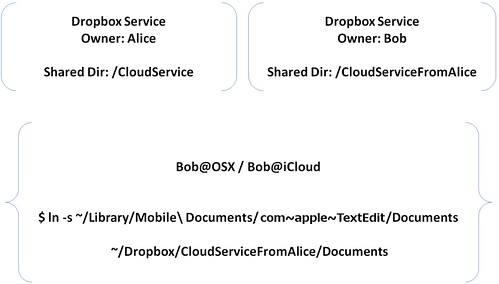
首先,以 Windows + Alice@Dropbox 作為基準,安裝完 Dropbox 後,建一個目錄 CloudService 目錄後,並分享給 Bob@dropbox,假設 Bob 得到的目錄是 ~/Dropbox/CloudServiceFromAlice。


在 Bob@dropbox 裡建立一個 symbolic link 讓同步 OSX 的 ~/Library/Mobile\ Documents/com~apple~TextEdit/Documents目錄(請先備份好了,以免出事),如此一來,就等同於把 Bob@iCloud 的文件分享到 Dropbox 服務上,而 Alice@dropbox 也可以讀取此份文件

$ cd ~/Dropbox
$ ln -s ~/Library/Mobile\ Documents/com~apple~TextEdit/Documents ~/Dropbox/CloudServiceFromAlice/Documents