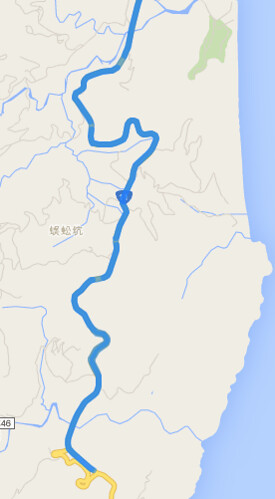
使用 GPS Location 畫圖時,點太多太精細,容易畫很慢,點太少太粗糙時,發現畫出的線會很糟,例如截彎取直的現象。雖然正解應該是先把精細路徑畫出圖來用,例如每個 zoom level 都畫好路線圖,而非動態畫線、畫點。但就是想偷懶透過 Google Maps API 來畫圖 XD 因此就研究了一下 Directions Service:https://developers.google.com/maps/documentation/javascript/directions
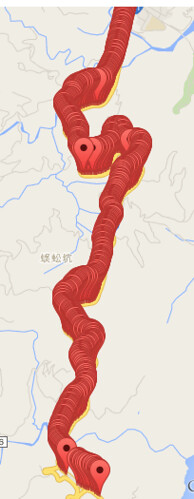
假設原路線共有 2000 個精細點,接著取 200 個 sample 點出來,接著想想看怎樣用 Google Maps API 來畫圖。如果單純把這兩百個點畫連線,就會出現截彎取直的現象,因此,想到 Google 導航,透過導航機制自動幫你把路線畫得服服貼貼,畢竟 GPS 收集時也還有誤差問題,真正要做的好,還得把 GPS 位置修到路徑上,有許多眉眉角角。
在使用 Google Maps Directions Service 時,要留意限制,例如有 OVER_QUERY_LIMIT、MAX_WAYPOINTS_EXCEEDED 等限制,不是你想做就可以做:
- OVER_QUERY_LIMIT indicates the webpage has sent too many requests within the allowed time period.
- MAX_WAYPOINTS_EXCEEDED indicates that too many DirectionsWaypoints were provided in the DirectionsRequest. The maximum allowed waypoints is 8, plus the origin, and destination. Google Maps API for Work customers are allowed 23 waypoints, plus the origin, and destination. Waypoints are not supported for transit directions.
因此,需要將 200 個點,切成若干次 request ,每一個 request 含頭尾只能有 8 個座標點,其中給予頭尾就可以導航了,而其中的 6 個中繼點只是可以精細導航路線不會飄走。大概是這樣的概念處理資料,200個點,以 8 個點為單位 = 25 次 requests ,會踩到 OVER_QUERY_LIMIT 。儘管可以再透過 call api 的頻率來解決,但我又偷懶把 200 個點限縮成 5~6 次的 requests,然後再連續的 GPS 中,透過平均個數抽 6 個點出來,讓一個 request 還是有八個點,只是更不精細。
總之,程式碼大概長這樣:
<html>

<head>

<script src="https://code.jquery.com/jquery-2.1.4.min.js"></script>

<script src="https://maps.googleapis.com/maps/api/js?signed_in=true&callback=initMap" async defer></script>

<script>

var routes = [];

var points = [];

function initMap() {

 var map = new google.maps.Map(document.getElementById('map'), {

  zoom: 15,

  center: {lat: 23.900422, lng: 121.603807}

 });


 var prev = null;

 for (var i=0, cnt=data['results'].length; i<cnt ; ++i) {

  var point = new google.maps.LatLng(data['results'][i]['location'].lat,data['results'][i]['location'].lng);

  points.push({

   location: point,

   stopover: false, // 是否顯示

  });


  // add marker

  if (0) {

   var marker = new google.maps.Marker({

    map: map,

    position: point,

   });

  }

  if (prev) {

   // use multiple routes

   routes.push({

    origin: prev,

    destination: point,

    travelMode: google.maps.TravelMode.DRIVING

   });

  }

  prev = point;

 }


 var directionsService = new google.maps.DirectionsService;

 // multiple routes

 // https://developers.google.com/maps/documentation/javascript/directions

 if (0) {

  for (var i=0, cnt=routes.length ; i<cnt ; ++i) {

   console.log(i);

   directionsService.route(routes[i], function(result, status) {

    if (status == google.maps.DirectionsStatus.OK) {

     var directionsDisplay = new google.maps.DirectionsRenderer({

      suppressMarkers: true

     });

     directionsDisplay.setMap(map);

     directionsDisplay.setDirections(result);

    }

   } );

  }

 }


 // use multiple stops

 // https://developers.google.com/maps/documentation/javascript/directions#Waypoints

 var max_steps = 36;

 for (var i=0, cnt=points.length; i < cnt ; i += max_steps) {

  var stops = []; // max should be 8

  var next_stop = Math.floor(max_steps / (8-2) );

  for (var j=i+next_stop ; j<(max_steps - next_stop) && j < (cnt - 1) ; j += next_stop)  // 去頭去尾, 頭擺在 origin

   stops.push(points[j]);

  var request = {

   origin: points[i].location,

   destination: i+(max_steps - 1) < cnt ? points[i+max_steps-1].location : points[cnt-1].location,

   waypoints: stops,

   travelMode: google.maps.TravelMode.DRIVING,

  };

  directionsService.route(request, function(result, status) {

   if (status == google.maps.DirectionsStatus.OK) {

    var directionsDisplay = new google.maps.DirectionsRenderer({

     suppressMarkers: true // 單純畫路線,不要顯示 marker

    });

    directionsDisplay.setMap(map);

    directionsDisplay.setDirections(result);

   } else {

    console.log( status ); // OVER_QUERY_LIMIT, MAX_WAYPOINTS_EXCEEDED

   }

  } );

 }

}


var data =

{

  "results": [

      {

         "elevation" : 17.00912857055664,

         "location" : {

            "lat" : 23.900397,

            "lng" : 121.603762

         },

         "resolution" : 610.8129272460938

      },

      {

         "elevation" : 20.88261413574219,

         "location" : {

            "lat" : 23.898869,

            "lng" : 121.603903

         },

         "resolution" : 610.8129272460938

      },

      {

         "elevation" : 22.29166030883789,

         "location" : {

            "lat" : 23.896661,

            "lng" : 121.60384

         },

         "resolution" : 610.8129272460938

      },

      {

         "elevation" : 20.24537467956543,

         "location" : {

            "lat" : 23.895185,

            "lng" : 121.60387

         },

         "resolution" : 610.8129272460938

      },

      {

         "elevation" : 30.49811744689941,

         "location" : {

            "lat" : 23.891678,

            "lng" : 121.603371

         },

         "resolution" : 610.8129272460938

      },

      // ...

   ]

};

</script>

</head>

<body>

 <div id="map" style="width:100%; height:100%;"></div>

</body>

</html>
