顯示具有 godaddy 標籤的文章。 顯示所有文章

2014年6月20日 星期五

AWS 筆記 - 從 Godaddy 搬到 AWS Route 53


AWS Route 53 有很多收費機制,但為了 GeoDNS 的使用,開始來搬遷。原先購買的 Domain name 是在 Godaddy 上購買以維護的,整個匯出流程還滿容易的。

  1. AWS Route 53: Create Hosted Zone

  2. AWS Route 53: Import Zone File

  3. Godaddy: Export DNS Setttings

  4. AWS Route 53: Import Zone File 貼上需要的,如 A系列、CNAME系列、MX系列等

  5. Godaddy: Set NameServer,改用 AWS Route 53 提供的清單


最後,可以用 dig 去追蹤看看,是不是真的改用 AWS Route 53 提供的 NS 囉

$ dig +trace example.com

2014年4月10日 星期四

重簽 Godaddy SSL 憑證 (re-keying an SSL Certificate)

熱門議題 OpenSSL Security Advisory [07 Apr 2014] / CVE-2014-0160 的影響,要把所以 Web Server 用的 HTTPS 重新整理,由於使用 Godaddy 維護 SSL 憑證,所以,直接看 Godaddy 流程:Re-Keying an SSL Certificate

  1. Log in to your SSL Manager.
  2. Go to the Manage Certificates tab.
  3. In the Filters list, click Certificates.
  4. Select the certificate(s) you want to re-key, and then click Re-Key. The Re-Key Certificate page displays.
  5. If your domain name uses our shared hosting, and you want to switch to third-party hosting or one of our virtual private or dedicated servers: For What would you like to do?, select Un-install this certificate.
  6. In the CSR field, paste your new CSR, including ----BEGIN NEW CERTIFICATE REQUEST---- and ----END CERTIFICATE REQUEST----.
  7. Select a Signature algorithm and a Certificate issuing organization, and then click Re-Key. We'll send you an email message with instructions to validate and download your certificate.

NOTE: This operation removes your existing SSL certificate from your shared hosting account, causing temporary website downtime for up to 72 hours.

2014年2月27日 星期四

[Linux] 申請 Godaddy Wildcard Certificate 和設定 Nginx Web Server @ Ubuntu 12.04

ssl-01

在 Godaddy 購買 Domain Name,接著就來申請 SSL 憑證,依據需求就買了 wildcard certificate 版本。自簽憑證的經驗不少,但是還沒設定過 wildcard 版本 XD
ssl-03

首先先完成 Godaddy 的購買,可以參考 [筆記] SSL 憑證購買記

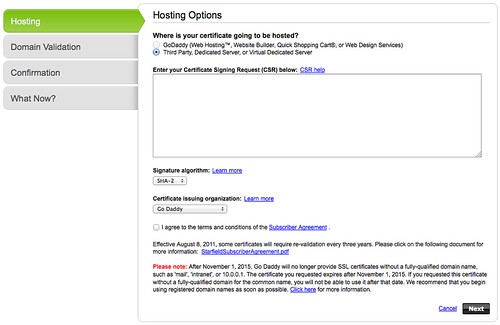
接著,很快就進入 Godaddy SSL 設定界面,並要求貼上 Certificate Signing Request(CSR) 資料。這邊需留意的是建立 CSR 的過程中,以前在 Common Name 總是輸入完整的 hostname (如 blog.changyy.org),現在要改輸入成 * 開頭(如: *.changyy.org),算是關鍵之處。

$ openssl req -new -newkey rsa:2048 -nodes -keyout wildcard.domainname.key -out wildcard.domainname.csr

最後再把 wildcard.domainname.csr 打開後,複製內文貼上即可進行。

ssl-04

由於是購買 wildcard 版本,如果 common name 不是輸入 * 開頭,會看到錯誤訊息,也是個不錯的防呆。

ssl-06

接著,再切換到下載頁面,就可以挑選屬於自己的 web server 資料。

對於 nginx 的部分,下載回來共有兩個 csr 檔案,對 apache web server 而言,可以分開設定剛剛好,但 nginx 只有 ssl_certificate 跟 ssl_certificate_key 兩個啊,因此,只要把 godaddy 給你的兩個 crt 串起來使用即可:

$ cp xxxx.crt hostname.crt
$ cat gd_bundle-g2-g1.crt >> hostname.crt


接著在 nginx 設定檔中,把 ssl_certificate 填 hostname.crt 而 ssl_certificate_key 則是最早建立 crt 的 key (此例 wildcard.domainname.key)