顯示具有 routing 標籤的文章。 顯示所有文章

2022年2月15日 星期二

[PHP] 使用 Built-in web server 和 Router Script 開發嵌入式產品的網頁介面

話說幾年前也寫過一篇筆記 [PHP] 使用 PHP built-in web server 及 PHP CodeIgniter framework 。現在則是使用的場景不同了,在筆記一下使用的情境。

不少嵌入式產品的 UI 是採用 Web 實作的,近幾年則是趨向於 App UI 。然而開發 embedded linux 產品時,其 Web UI 也是打包到 embedded linux 裡頭,這時要開發測時,就滿不方便。若只是單純改改裡頭 js code 則可以免強靠 Browser 做 JS Inject 來達成。

目前協助擴展嵌入式產品的 Web UI 維護團隊,過去曾嘗試把裡頭的 Web UI 使用 Vue.js 跟 webpack 打包機制,弄出個 webpack 自起 Web Server 並透過 devServer.proxy 把 CGI request 導向到實體 device ip。目前因為沒有啟用 Vue.js 所以也沒啟用 webpack 等機制,暫時就先用簡單的 PHP 內置Web Server 機制

$ php -S localhost:8000 -t PATH_DOCUMENT_ROOT

然而,在 fw build code 流程中,可能會有多處檔案搬移的設計,以 Web 來說,大概可以硬搞成 /js/main.js 其實擺在 /tmp/path1/js 中,而 /css/main.css 擺在 /tmp/path2/css 等等,這時就要靠 使用路由(Router)脚本 來處理

$ cat routing.php
<?php

$URL_PATH = parse_url($_SERVER['REQUEST_URI'], PHP_URL_PATH);

if (!strncmp($URL_PATH, '/js/', 4)) {
$file_path = '/tmp/path1/js' . $URL_PATH;
if (file_exists($file_path)) {
echo file_get_contents($file_path);
return true;
}
}

if (!strncmp($URL_PATH, '/css/', 4)) {
$file_path = '/tmp/path2/css' . $URL_PATH;
if (file_exists($file_path)) {
echo file_get_contents($file_path);
return true;
}
}
return false;

使用:

$ php -S localhost:8000 -t /tmp routing.php

如此,若有一包 fw code 時,可透過 routing 機制指定某些檔案要從哪裡取得(例如需要 patch 的檔案等),因而避開 build code 後才能測試,便方便許多。另外,還須多補寫一下 /cgi-bin/ 的部分,在把 request 改發到對應的裝置上,如此在面對不需改動 CGI 問題時,可以輕鬆測試 Web UI。

另外,該 routing.php 也可以很結構化:

$ cat routing.php
<?php

function log_info($message) {
$stderr = fopen('php://stderr', 'w');
fprintf($stderr, '=> '.$message."\n");
fclose($stderr);
}
function tree_files( $input_file ) {
if (!file_exists($input_file))
return array();

if (is_dir($input_file)) {
$output = array();
if ($handle = opendir($input_file)) {
while (false !== ($file = readdir($handle))) {
if ($file == '.' || $file == '..')
continue;
$path = $input_file . '/' . $file;
if (!file_exists($path))
continue;
if (is_dir($path)) {
$sub_output = tree_files( $path );
foreach($sub_output as $f) {
array_push($output, $f);
}
} else {
array_push($output, $path);
}
}
closedir($handle);
}
return $output;
}
return array( $input_file );
}
$request_handler = array(
'routing' => array(
'file' => array(
'/index.html' => '/tmp/study/haha.html',
'/world.html' => '/tmp/study/hello/',
),
'dir' => array(
'/js/' => '/tmp/study',
'/css/' => '/tmp/study',
),
),
'content_type' => array(
'html' => 'text/html',
'htm' => 'text/html',
'css' => 'text/css',
'js' => 'text/javascript',
'svg' => 'image/svg+xml',
),
);

$URL_PATH = parse_url($_SERVER['REQUEST_URI'], PHP_URL_PATH);
$path_parts = pathinfo($URL_PATH);

log_info('routing-init, URL_PATH:['.$URL_PATH.'], REQUEST_URI:['.$_SERVER['REQUEST_URI'].']');
log_info('in routing-file mode');
foreach($request_handler['routing']['file'] as $pattern => $target ) {
if (!strncmp($URL_PATH, $pattern, strlen($pattern))) {
log_info('in routing-file mode: match pattern: ['.$pattern.'], target: ['.$target.']');
$path = is_dir($target) ? $target . $URL_PATH : $target;
if (file_exists($path)) {
$path_parts = pathinfo($URL_PATH);
$content_type = isset($request_handler['content_type'][$path_parts['extension']]) ? $request_handler['content_type'][$path_parts['extension']]: mime_content_type($path);

header('Content-Type: ' . $content_type);
$size = filesize($path);
header('Content-Length: '.$size);
echo file_get_contents($path);
log_info('routing-file, response: content-type:['.$content_type.'], content-length:['.$size.'], path:['.$path.']');
return true;
}
}
}
log_info('in routing-dir mode');
foreach($request_handler['routing']['dir'] as $pattern => $target ) {
if (!strncmp($URL_PATH, $pattern, strlen($pattern))) {
log_info('in routing-dir mode: match pattern: ['.$pattern.'], target: ['.$target.']');
$path = $target.$URL_PATH;
if (file_exists($path)) {
$path_parts = pathinfo($URL_PATH);
$content_type = isset($request_handler['content_type'][$path_parts['extension']]) ? $request_handler['content_type'][$path_parts['extension']]: mime_content_type($path);

header('Content-Type: ' . $content_type);
$size = filesize($path);
header('Content-Length: '.$size);
echo file_get_contents($path);
log_info('routing-dir, response: content-type:['.$content_type.'], content-length:['.$size.'], path:['.$path.']');
return true;
}
}
}

return false;

如此一來,在 /tmp/study 又建立一個檔案結構:

% tree /tmp/study 
/tmp/study
├── css
│   └── main.css
├── haha.html
├── hello
│   └── world.html
└── js
    └── main.js

3 directories, 4 files

使用 php -S localhost:8000 routing.php 時,就會一些目錄切換的對應機制。

2015年8月21日 星期五

Javascript 開發筆記 - 透過 Google Maps Routing API 畫路徑 (Directions Service)

Google Maps Directions Service

使用 GPS Location 畫圖時,點太多太精細,容易畫很慢,點太少太粗糙時,發現畫出的線會很糟,例如截彎取直的現象。雖然正解應該是先把精細路徑畫出圖來用,例如每個 zoom level 都畫好路線圖,而非動態畫線、畫點。但就是想偷懶透過 Google Maps API 來畫圖 XD 因此就研究了一下 Directions Service:https://developers.google.com/maps/documentation/javascript/directions

2000個點

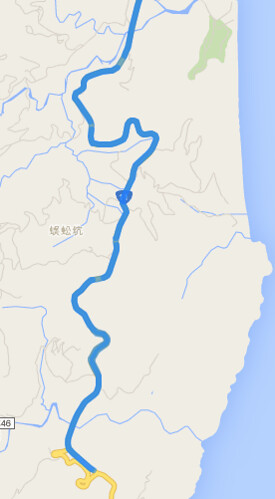
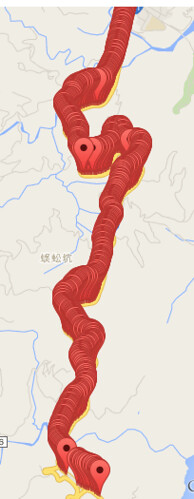
假設原路線共有 2000 個精細點,接著取 200 個 sample 點出來,接著想想看怎樣用 Google Maps API 來畫圖。如果單純把這兩百個點畫連線,就會出現截彎取直的現象,因此,想到 Google 導航,透過導航機制自動幫你把路線畫得服服貼貼,畢竟 GPS 收集時也還有誤差問題,真正要做的好,還得把 GPS 位置修到路徑上,有許多眉眉角角。

在使用 Google Maps Directions Service 時,要留意限制,例如有 OVER_QUERY_LIMIT、MAX_WAYPOINTS_EXCEEDED 等限制,不是你想做就可以做:

  • OVER_QUERY_LIMIT indicates the webpage has sent too many requests within the allowed time period.
  • MAX_WAYPOINTS_EXCEEDED indicates that too many DirectionsWaypoints were provided in the DirectionsRequest. The maximum allowed waypoints is 8, plus the origin, and destination. Google Maps API for Work customers are allowed 23 waypoints, plus the origin, and destination. Waypoints are not supported for transit directions.

因此,需要將 200 個點,切成若干次 request ,每一個 request 含頭尾只能有 8 個座標點,其中給予頭尾就可以導航了,而其中的 6 個中繼點只是可以精細導航路線不會飄走。大概是這樣的概念處理資料,200個點,以 8 個點為單位 = 25 次 requests ,會踩到 OVER_QUERY_LIMIT 。儘管可以再透過 call api 的頻率來解決,但我又偷懶把 200 個點限縮成 5~6 次的 requests,然後再連續的 GPS 中,透過平均個數抽 6 個點出來,讓一個 request 還是有八個點,只是更不精細。

總之,程式碼大概長這樣:

<html>
<head>
<script src="https://code.jquery.com/jquery-2.1.4.min.js"></script>
<script src="https://maps.googleapis.com/maps/api/js?signed_in=true&callback=initMap" async defer></script>
<script>
var routes = [];
var points = [];
function initMap() {
var map = new google.maps.Map(document.getElementById('map'), {
zoom: 15,
center: {lat: 23.900422, lng: 121.603807}
});

var prev = null;
for (var i=0, cnt=data['results'].length; i<cnt ; ++i) {
var point = new google.maps.LatLng(data['results'][i]['location'].lat,data['results'][i]['location'].lng);
points.push({
location: point,
stopover: false, // 是否顯示
});

// add marker
if (0) {
var marker = new google.maps.Marker({
map: map,
position: point,
});
}
if (prev) {
// use multiple routes
routes.push({
origin: prev,
destination: point,
travelMode: google.maps.TravelMode.DRIVING
});
}
prev = point;
}

var directionsService = new google.maps.DirectionsService;
// multiple routes
// https://developers.google.com/maps/documentation/javascript/directions
if (0) {
for (var i=0, cnt=routes.length ; i<cnt ; ++i) {
console.log(i);
directionsService.route(routes[i], function(result, status) {
if (status == google.maps.DirectionsStatus.OK) {
var directionsDisplay = new google.maps.DirectionsRenderer({
suppressMarkers: true
});
directionsDisplay.setMap(map);
directionsDisplay.setDirections(result);
}
} );
}
}

// use multiple stops
// https://developers.google.com/maps/documentation/javascript/directions#Waypoints
var max_steps = 36;
for (var i=0, cnt=points.length; i < cnt ; i += max_steps) {
var stops = []; // max should be 8
var next_stop = Math.floor(max_steps / (8-2) );
for (var j=i+next_stop ; j<(max_steps - next_stop) && j < (cnt - 1) ; j += next_stop)  // 去頭去尾, 頭擺在 origin
stops.push(points[j]);
var request = {
origin: points[i].location,
destination: i+(max_steps - 1) < cnt ? points[i+max_steps-1].location : points[cnt-1].location,
waypoints: stops,
travelMode: google.maps.TravelMode.DRIVING,
};
directionsService.route(request, function(result, status) {
if (status == google.maps.DirectionsStatus.OK) {
var directionsDisplay = new google.maps.DirectionsRenderer({
suppressMarkers: true // 單純畫路線,不要顯示 marker
});
directionsDisplay.setMap(map);
directionsDisplay.setDirections(result);
} else {
console.log( status ); // OVER_QUERY_LIMIT, MAX_WAYPOINTS_EXCEEDED
}
} );
}
}

var data =
{
  "results": [
      {
         "elevation" : 17.00912857055664,
         "location" : {
            "lat" : 23.900397,
            "lng" : 121.603762
         },
         "resolution" : 610.8129272460938
      },
      {
         "elevation" : 20.88261413574219,
         "location" : {
            "lat" : 23.898869,
            "lng" : 121.603903
         },
         "resolution" : 610.8129272460938
      },
      {
         "elevation" : 22.29166030883789,
         "location" : {
            "lat" : 23.896661,
            "lng" : 121.60384
         },
         "resolution" : 610.8129272460938
      },
      {
         "elevation" : 20.24537467956543,
         "location" : {
            "lat" : 23.895185,
            "lng" : 121.60387
         },
         "resolution" : 610.8129272460938
      },
      {
         "elevation" : 30.49811744689941,
         "location" : {
            "lat" : 23.891678,
            "lng" : 121.603371
         },
         "resolution" : 610.8129272460938
      },
      // ...
   ]
};
</script>
</head>
<body>
<div id="map" style="width:100%; height:100%;"></div>
</body>
</html>

2014年3月18日 星期二

[PHP] CodeIgniter 處理多層子目錄 Routing 問題

[PHP] CodeIgniter 處理多層子目錄 Routing 問題

過去使用 CodeIgniter 一直以為在 application/controller 裡的目錄結構可以無限延伸使用,如:

application/conotrollers/service/dashboard/product.php
application/conotrollers/service/api/product.php
application/conotrollers/service/welcome.php
application/conotrollers/welcome.php


當瀏覽 hostname/ 可以由 conotrollers/welcome.php 處理,瀏覽 hostname/service/welcome 則由 conotrollers/service/welcome.php 處理,一切正常。

但瀏覽 hostname/service/api/product 和 hostname/service/dashboard/product 時,卻噴 404 Page Not Found 訊息。

一開始以為 nginx rules 設定錯誤,追一下 CodeIgniter 的 source code 後,發現 CodeIgniter 的程式碼沒有用遞迴或等價方式去搜尋子目錄,再透過相關關鍵字才發現,關於多層子目錄的需求,則只能透過指定 routing 的設定方式進行,但對應到還是一層目錄結構:

例如 hostname/service/dashboard/product 用法:

$ vim application/config/routes.php

$route['service/(:any)/(:any)'] = 'service_$1/$2';


而目錄結構更新為:

application/conotrollers/service_dashboard/product.php
application/conotrollers/service_api/product.php
application/conotrollers/welcome.php


簡言之,就是以 application/controllers 為基準,頂多再加一層 subdir 而已,而想要 uri 有多層的含義,只能自定 route 來達到。